
Electron in Practice: Local Logging
Table of Contents

Preface
After developing a local app with Electron,
local logging is essential.
It helps capture user actions and locate bugs.
Local logs differ from real-time analytics —
they are larger, more detailed, and not all information is suitable for reporting.
Similarities and Differences with Node.js Logging
Writing local logs in Electron is similar to Node.js.
If you want to build your own, refer to this article: Node.js WebServer in Practice: Local Logging
The differences are:
1. The timing of logger initialization
2. Renderer process logs are sent to the main process via IPC and then written locally
qiao-x-logger
An npm package has been created for this — feel free to use it: https://code.insistime.com/#/qiao-x-logger
Initialization
It is recommended to initialize as early as possible so that more log information can be captured.
For example, initialize on the first line of the Electron entry JS file:
// init
import { initLogger } from "qiao-x-logger";

// init logger
const loggerPath = path.resolve(app.getPath("logs"), "./electron.log");
initLogger(loggerPath);
Main Process Usage
Using it in the main process is straightforward:
// logger
import { Logger } from "qiao-x-logger";
const logger = Logger("sips.js");

logger.info("iconutil", "success");
Renderer Process Usage
In the renderer process, logs need to be sent to the main process via IPC before being written locally.
1. Initialize the main process IPC listener
// log ipc
import { logIPCInit } from "qiao-x-logger";

logIPCInit();
2. Preload setup
log-preload.js
// electron
import { ipcRenderer } from "electron";

/**
 * logIPC
 * @param {*} msg
 * @param {*} type debug,info,warn,error
 */
export const logIPC = (msg, type) => {
  ipcRenderer.send("ipc-log", { msg, type });
};
preload.js
// electron
import { contextBridge } from "electron";

// custom preload
import { logIPC } from "./log-preload.js";

// preload
contextBridge.exposeInMainWorld("electron", {
  logIPC,
});
3. Renderer process usage
window.electron.logIPC(`selectPngPath filePath ${filePath}`, "info");Result
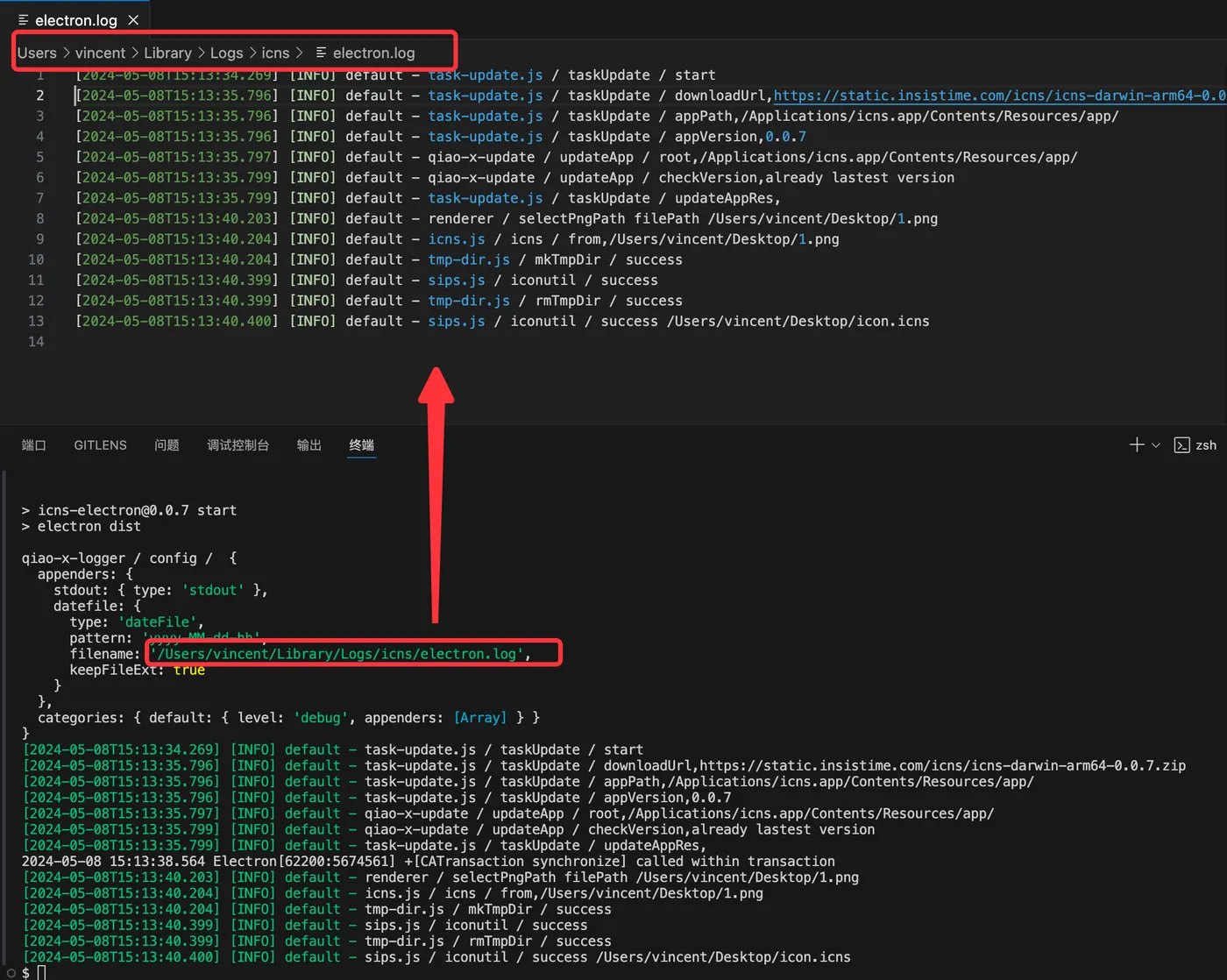
After writing logs, a log file will be generated at the logPath, split by hour.
The output looks like this:
Related Articles
Electron in Practice: Registering Shortcuts
Preface: This article introduces how to register keyboard shortcuts in an Electron app. Main Process: Registering shortcuts in the main process is straightforward — just make sure to do it after app ready. Common key mappings: https://www.electronjs.org/docs/latest/api/accelerator. Also remember to unregister all shortcuts when the app quits.
Electron in Practice: Update Strategies
Preface: After developing a desktop app with Electron, the next question is how to update subsequent versions. This article introduces several update strategies. Electron Architecture: An Electron desktop app consists of several parts: the Electron runtime itself, the main process (Node.js and non-Node.js parts), and the renderer process.
Electron in Practice: Customizing Mac Menus
Preface: Previous articles covered developing an Electron app through to Mac packaging. Related articles: Learn Electron in One Article, Electron in Practice: Local Database SQLite, Electron in Practice: Managing Electron Projects with Monorepo, Electron in Practice: Mac Packaging, Electron in Practice: Registering an Apple Developer Account.
Electron in Practice: Package Size Optimization
Preface The previous articles covered developing an Electron app through to Mac packaging. Related articles: Learn Electron in One Article, Electron in Practice: Local Database SQLite, Electron in Practice: Managing Electron Projects with Monorepo, Electron in Practice: Mac Packaging, Electron in Practice: Register
Electron in Practice: DMG Installer Customization
Preface A dmg file is a common installer format on Mac. The previous articles have already developed and packaged an application using Electron. This article focuses on customizing the dmg installer.