
StableDiffusionWebUI: Mac Installation
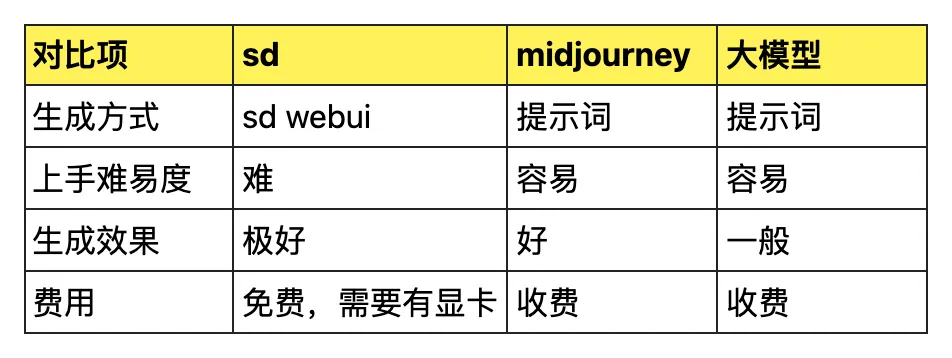
Table of Contents

Preface
Currently there are several common approaches for AIGC image generation:
-
SD image generation
-
Midjourney image generation: https://www.midjourney.com/home
-
Other large model image generation
Here is a brief comparison across several dimensions:
SD Introduction
There are 3 SD-related projects on GitHub:
https://github.com/CompVis/stable-diffusion
https://github.com/Stability-AI/stablediffusion
https://github.com/AUTOMATIC1111/stable-diffusion-webui
The first one is V1, which is currently the most widely used version.
The second one is V2, which is used less frequently.
The third one is a WebUI for V1 developed by the community.
The first two don’t have a UI interface. Generally, the third one with a WebUI is used.
Mac Installation
Mac installation guide for sd-webui: https://github.com/AUTOMATIC1111/stable-diffusion-webui/wiki/Installation-on-Apple-Silicon
Install Homebrew
Since sd-webui depends on many third-party packages, it is recommended to install Homebrew for Mac first.
Link: https://brew.sh/
Since Homebrew downloads from overseas servers,
it is recommended to configure a proxy for much faster speeds.
export https_proxy=http://127.0.0.1:7890
export http_proxy=http://127.0.0.1:7890
Install Dependencies
After installing Homebrew, install the sd-webui dependencies:
brew install cmake protobuf rust python@3.10 git wgetClone the Project
Clone the sd-webui project:
git clone https://github.com/AUTOMATIC1111/stable-diffusion-webuiDownload Image Generation Models
Download the desired image generation models to this location:
stable-diffusion-webui/models/Stable-diffusionRecommended models for beginners: https://github.com/AUTOMATIC1111/stable-diffusion-webui/wiki/Installation-on-Apple-Silicon#downloading-stable-diffusion-models
Launch WebUI
cd stable-diffusion-webui
./webui.sh
pip Proxy
The startup process requires installing Python dependencies,
which can also be slow. It is recommended to configure a proxy.
export HTTPS_PROXY=http://127.0.0.1:7890
export HTTP_PROXY=http://127.0.0.1:7890
sd-webui
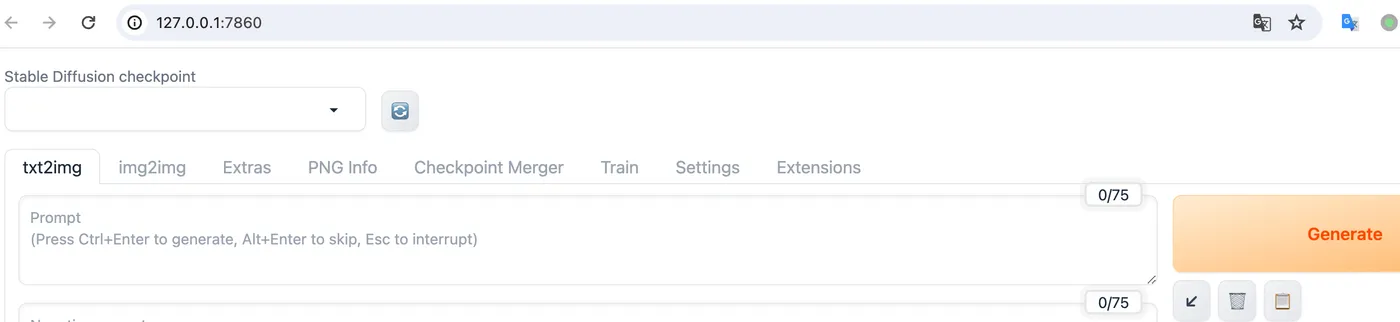
After a long wait, sd-webui has started.
It will automatically open a page.
SDWebUI
|—Link: https://sdwebui.ai/?from=vq
|—Authentic Stable Diffusion WebUI V1.10.1~
|—Top-tier 4090 GPU, premium members get exclusive single 4090 card for image generation~
|—Supports Mac client, Windows client, and Web online usage~
|—Innovative instant model transfer feature, instantly use local models~
|—Supports txt2img, img2img, extras, and PNG info
|—Supports CLIP interrogation and DeepBooru interrogation
|—Supports Hires.fix with 21 built-in upscaling models
|—Supports ADetailer with 11 built-in repair models
|—Supports ControlNet with 44 built-in preprocessors and 68 built-in models
|—Supports super-resolution upscaling (Tiled Diffusion, Demo Fusion, Tiled VAE)
|—Supports old photo restoration with 21 built-in upscaling models, plus GFPGAN and CodeFormer restoration models
|—Built-in 2 common Styles, 11 popular Checkpoint models, 7 popular LoRA models, 14 common embeddings
|—Built-in oldsix prompt plugin
|—Built-in 23-lesson beginner tutorial
Related Articles
sdwebui.ai - Ready-to-Use Native sdwebui
sdwebui.ai sdwebui.ai is a ready-to-use native online sdwebui. URL: https://www.sdwebui.ai/ Authentic Stable Diffusion WebUI V1.10.1 Top-tier 4090 GPU, premium members get exclusive single 4090 for image generation Supports Mac client, Windows client, and Web online usage
StableDiffusionWebUI: Detail Repair (ADetailer)
Using ADetailer to fix facial and hand details in Stable Diffusion — installation, usage, parallel repair, and model comparison.
SodaArt - Restore Old Photos in Three Steps
Environment Setup Open https://sodaart.ai/, download the Mac or Windows client, install and open it locally, or click Online Generation to open the web version directly. Step 1: Log in to the homepage Use your phone number + verification code to log in, then click Online Generation. Step 2: Upload old photos in the Extras tab Under Online Generation - Extras tab, upload your old photos. Step 3: Configure
StableDiffusionWebUI: Old Photo Restoration (GFPGAN)
Preface: One of the use cases for sdwebui is old photo restoration. Common old photo restoration tools existed before sdwebui, including GFPGAN and CodeFormer. However, combining them with Hires.fix in sdwebui yields even better results.
StableDiffusionWebUI: Image Info (PNG Info)
Preface: PNG Info is a built-in feature of sdwebui that is essential in everyday image generation workflows. It allows you to upload an image, read its meta information, parse the generation parameters, and conveniently send them to other features like txt2img, img2img, and inpainting.