
StableDiffusionWebUI: Old Photo Restoration (GFPGAN)

Preface
One of the use cases for sdwebui is old photo restoration.
In fact, common old photo restoration tools existed before sdwebui:
GFPGAN: https://github.com/TencentARC/GFPGAN
CodeFormer: https://github.com/sczhou/CodeFormer
However, combining them with Hires.fix in sdwebui yields even better results.
Extras
sdwebui conveniently places some common features in the Extras tab.
This section focuses on GFPGAN and CodeFormer.
Upload Old Photo
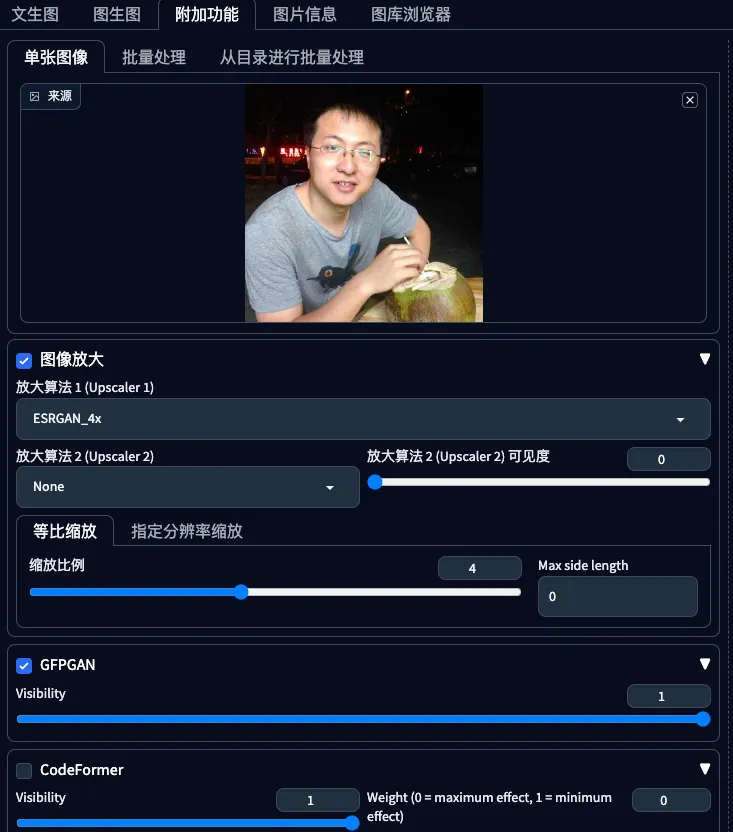
Under the Extras tab, in the first area you can click or drag and drop an old photo.
Image Upscaling
In the second area, select the image upscaling algorithm and other parameters.
Here we choose ESRGAN-4x. For other algorithms, see: https://blog.vincentqiao.com/sd-hiresfix-m
Set the scale factor to 4x.
GFPGAN
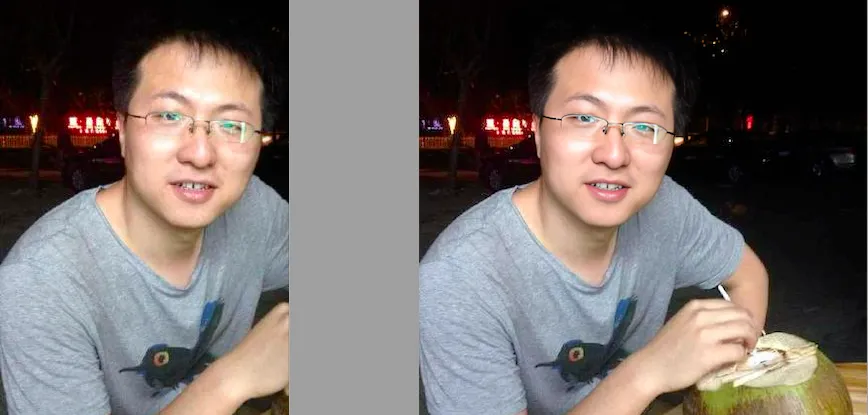
Simply check the box, and sdwebui will automatically download the GFPGAN-related files.
The upscaling result is shown below. Personally, I think the result is quite good.
CodeFormer
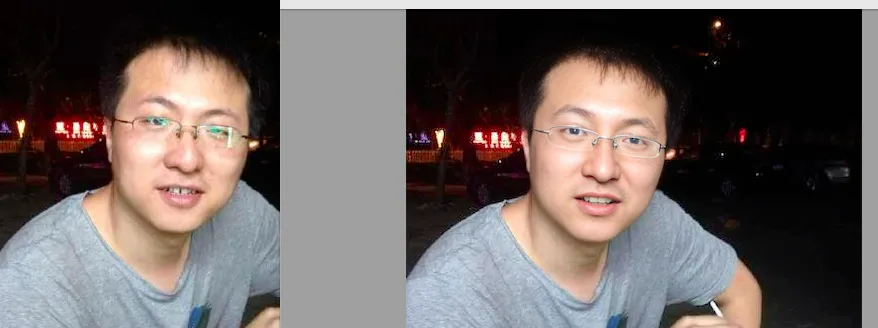
Similarly, just check the box, and sdwebui will automatically download the CodeFormer-related files.
The upscaling result is shown below. It doesn’t seem as good as GFPGAN, mainly because the glasses area is slightly distorted.
Summary
For old photo upscaling tasks, the recommended configuration is:
Upscaling algorithm: ESRGAN-4x
Upscaling tool: GFPGAN
SDWebUI
|—Link: https://sdwebui.ai/?from=vq
|—Authentic Stable Diffusion WebUI V1.10.1~
|—Top-tier 4090 GPU, premium members get exclusive single 4090 card for image generation~
|—Supports Mac client, Windows client, and Web online usage~
|—Innovative instant model transfer feature, instantly use local models~
|—Supports txt2img, img2img, extras, and PNG info
|—Supports CLIP interrogation and DeepBooru interrogation
|—Supports Hires.fix with 21 built-in upscaling models
|—Supports ADetailer with 11 built-in repair models
|—Supports ControlNet with 44 built-in preprocessors and 68 built-in models
|—Supports super-resolution upscaling (Tiled Diffusion, Demo Fusion, Tiled VAE)
|—Supports old photo restoration with 21 built-in upscaling models, plus GFPGAN and CodeFormer restoration models
|—Built-in 2 common Styles, 11 popular Checkpoint models, 7 popular LoRA models, 14 common embeddings
|—Built-in oldsix prompt plugin
|—Built-in 23-lesson beginner tutorial
Related Articles
sdwebui.ai - Ready-to-Use Native sdwebui
sdwebui.ai sdwebui.ai is a ready-to-use native online sdwebui. URL: https://www.sdwebui.ai/ Authentic Stable Diffusion WebUI V1.10.1 Top-tier 4090 GPU, premium members get exclusive single 4090 for image generation Supports Mac client, Windows client, and Web online usage
StableDiffusionWebUI: Detail Repair (ADetailer)
Using ADetailer to fix facial and hand details in Stable Diffusion — installation, usage, parallel repair, and model comparison.
SodaArt - Restore Old Photos in Three Steps
Environment Setup Open https://sodaart.ai/, download the Mac or Windows client, install and open it locally, or click Online Generation to open the web version directly. Step 1: Log in to the homepage Use your phone number + verification code to log in, then click Online Generation. Step 2: Upload old photos in the Extras tab Under Online Generation - Extras tab, upload your old photos. Step 3: Configure
StableDiffusionWebUI: Image Info (PNG Info)
Preface: PNG Info is a built-in feature of sdwebui that is essential in everyday image generation workflows. It allows you to upload an image, read its meta information, parse the generation parameters, and conveniently send them to other features like txt2img, img2img, and inpainting.
StableDiffusionWebUI: Embeddings
Preface: Embeddings and text inversion both refer to textual embeddings, which can be simply understood as a collection of prompts used in both negative and positive prompts. Using Embeddings: Installation - After downloading embeddings, place them in stablediffusionwebui/embeddings. Usage - Select the desired embeddings under the embeddings tab.