
Using npm Workspaces for Frontend Monorepos

Preface
I had been using lerna to manage frontend monorepos projects.
After upgrading lerna today, I found that the bootstrap command is no longer supported,
replaced by npm’s workspaces-related commands.
lerna bootstrap
For lerna usage, see this article:
The lerna bootstrap command
is used to install dependencies for packages and manage inter-dependencies.
Here’s an example using a monorepos frontend project:
URL: https://github.com/uikoo9/offline-to-online
This project has 4 packages:
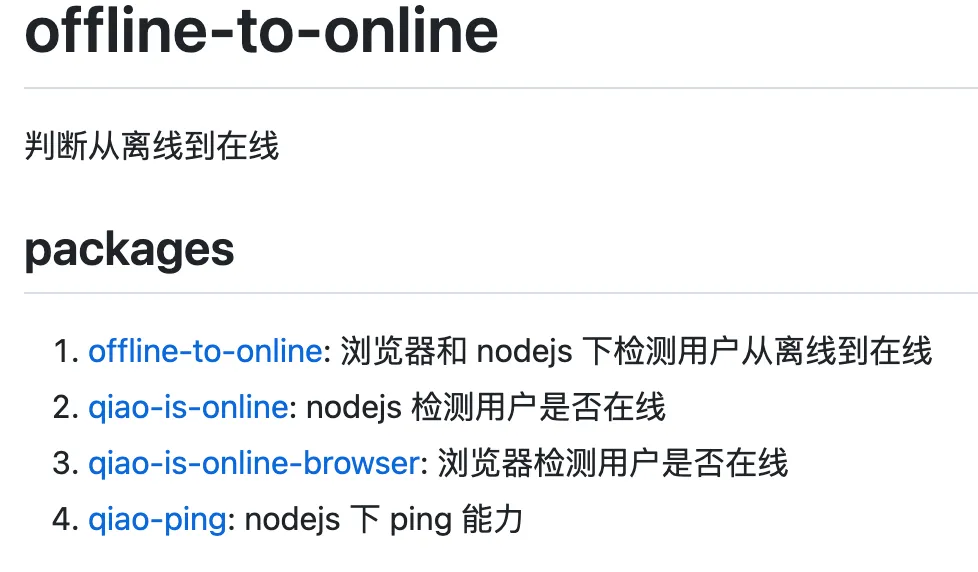
Their relationships are as follows:

As you can see, qiao-is-online depends on offline-to-online and qiao-ping.
After running lerna bootstrap, you can see that qiao-is-online’s dependencies are locally linked:

As you can see,
lerna’s previous bootstrap command mainly:
-
Installs dependencies for each package
-
If a dependency is a local package, it creates a local link instead of downloading it
However, lerna removed this command in version 7.0.0.
The prompt is as follows:

Lerna’s official explanation is here: https://lerna.js.org/docs/legacy-package-management
The gist is that package managers like npm already have the bootstrap capability,
so the command was removed in favor of npm’s workspaces feature.
npm workspaces
npm’s workspaces documentation: https://docs.npmjs.com/cli/v9/using-npm/workspaces
Let’s compare it with lerna bootstrap.
lerna.json vs package.json
The packages property in lerna.json declares the package locations.
For example, the config below tells lerna that packages are in the packages folder:
{
  "packages": ["packages/*"],
  "version": "3.1.6",
  "command": {
    "version": {
      "allowBranch": "master"
    },
    "publish": {
      "allowBranch": "master",
      "message": "chore(release): publish"
    }
  }
}
The workspaces property in package.json is similar.
For example, the config below tells npm that packages are in the packages folder:
{
  "name": "dishi-monorepo",
  "private": true,
  "workspaces": [
    "packages/*"
  ]
}
To use npm workspaces,
you need to modify lerna.json accordingly —
remove the packages property from lerna.json:
{
  "$schema": "node_modules/lerna/schemas/lerna-schema.json",
  "version": "3.1.8",
  "command": {
    "version": {
      "allowBranch": "master"
    },
    "publish": {
      "allowBranch": "master",
      "message": "chore(release): publish"
    }
  }
}
node_modules Location
After lerna bootstrap installs dependencies by default,
each package’s dependencies are in its own folder. For example:
qiao-is-online’s dependencies are in its own node_modules folder.

After adding the workspaces property to npm,
running npm i will install all package dependencies to the root node_modules.
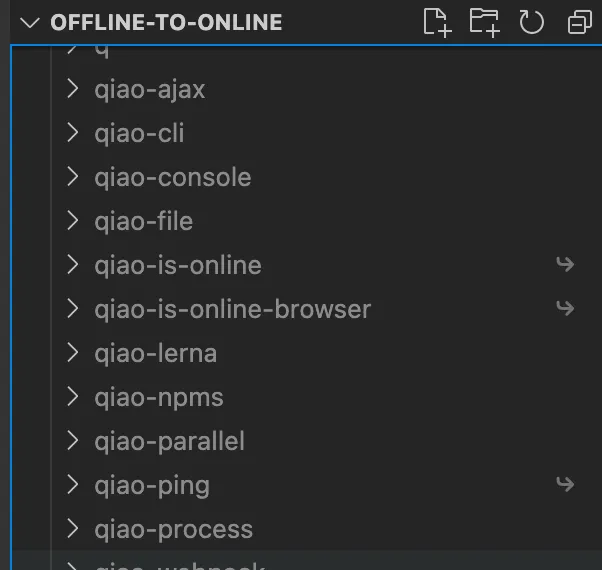
Although everything is installed at the root, locally interdependent packages are still linked.
The effect is similar to lerna bootstrap —hoist.
However, if a dependency exists at the root level
and also in a package under packages,
and the two versions differ — for example:
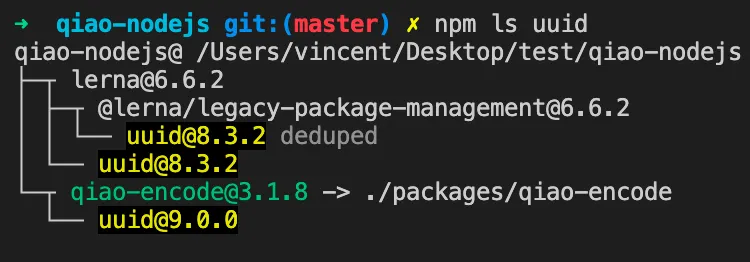
You can see that uuid in packages/qiao-encode depends on version 9.0.0,
while the root-level lerna depends on 8.3.2.
In this case, when using npm workspaces,
npm i will install the package’s dependency in the package’s own folder.
Summary
Lerna’s lerna bootstrap command
can be replaced by npm’s workspaces property and the npm i command.