
Node.js in Practice: High-Performance FS

Preface
The fs module in Node.js is familiar to most developers.
This article compares the three ways to use the fs module.
Three Ways to Use fs
Node.js officially provides three ways to use fs:
https://nodejs.org/dist/latest-v18.x/docs/api/fs.html#promise-example
Callback Approach
Example code:
const { unlink } = require('node:fs');

unlink('/tmp/hello', (err) => {
  if (err) throw err;
  console.log('successfully deleted /tmp/hello');
});
This is the most traditional approach,
fully embodying Node.js’s event-driven, non-blocking IO characteristics,
but the code nests, leading to callback hell..
Promise Approach
Example code:
const { unlink } = require('node:fs/promises');

(async function (path) {
  try {
    await unlink(path);
    console.log(`successfully deleted ${path}`);
  } catch (error) {
    console.error('there was an error:', error.message);
  }
})('/tmp/hello');
In this approach,
each API returns a Promise object,
which needs to be used with async / await.
Sync Approach
Example code:
const { unlinkSync } = require('node:fs');

try {
  unlinkSync('/tmp/hello');
  console.log('successfully deleted /tmp/hello');
} catch (err) {
  // handle the error
}
In this approach,
there is no code nesting,
and no need for async / await.
Summary
In terms of writing style alone: sync > promise > callback
Test Code
Next, we will test from two dimensions:
1. Time spent processing files
2. Performance of file processing
Using the simplest fs scenario — checking if a file exists.
The code for the three approaches is as follows:
Callback Approach
// fs
const { access } = require('node:fs');

// is exists
exports.isExistsCallback = function (filePath, callback) {
  access(filePath, (err) => {
    if (callback) callback(err ? false : true);
  });
};
Promise Approach
// fs
const { access } = require('node:fs/promises');

// is exists
exports.isExistsPromise = async function (filePath) {
  try {
    await access(filePath);
    return true;
  } catch (error) {
    return false;
  }
};
Sync Approach
// fs
const { accessSync } = require('node:fs');

// is exists
exports.isExistsSync = function (filePath) {
  try {
    accessSync(filePath);
    return true;
  } catch (error) {
    return false;
  }
};
Time Comparison
The test method is to pass in a non-existent path,
repeat n times, and compare the time spent.
Callback Approach Test Code
const { isExistsCallback } = require('./fs-callback.js');

const times = 10000;
let callIndex = 0;
const filePath = '/file/not/exists';

// test callback
function testCallback() {
  console.time('isExists by callback');

  isExistsCallback(filePath, callback);
}
function callback(res) {
  callIndex = callIndex + 1;

  if (callIndex === times) {
    console.timeEnd('isExists by callback');
  } else {
    isExistsCallback(filePath, callback);
  }
}
Promise Approach Test Code
const { isExistsPromise } = require('./fs-promise.js');

const times = 10000;
const filePath = '/file/not/exists';

// test promise
async function testPromise() {
  console.time('isExists by promise');

  for (let i = 0; i < times; i++) {
    await isExistsPromise(filePath);
  }

  console.timeEnd('isExists by promise');
}
Sync Approach Test Code
const { isExistsSync } = require('./fs-sync.js');

const times = 10000;
const filePath = '/file/not/exists';

// test sync
function testSync() {
  console.time('isExists by sync');

  for (let i = 0; i < times; i++) {
    isExistsSync(filePath);
  }

  console.timeEnd('isExists by sync');
}
Time Comparison
Repeated 10,000 times, the results are as follows:
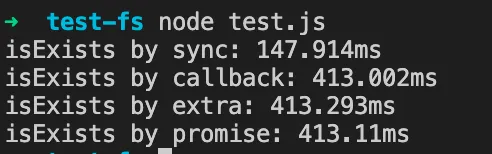
Repeated 100,000 times, the results are as follows:

Summary
In terms of file processing time: sync << ( callback < promise )
Performance Comparison
The performance comparison here
is not about comparing memory or CPU usage during file processing,
but rather the occupation of the Node.js process.
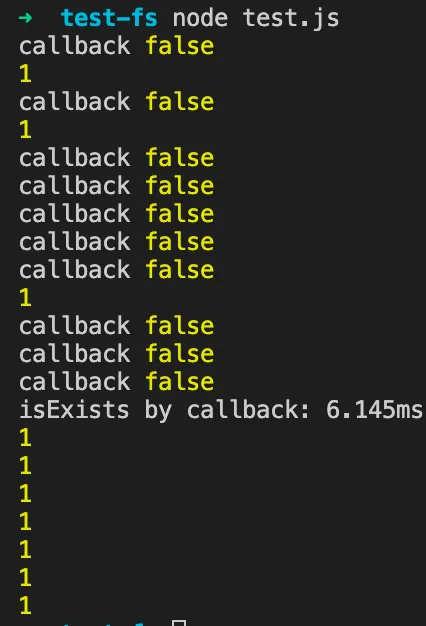
The test method is the same as above, just with an additional print every 1ms:
let intervalIndex = 0;
const intervalId = setInterval(() => {
  console.log(1);

  intervalIndex = intervalIndex + 1;
  if (intervalIndex === 10) clearInterval(intervalId);
}, 1);
And the repeat count is adjusted to 10.
Callback Approach Result
Promise Approach Result
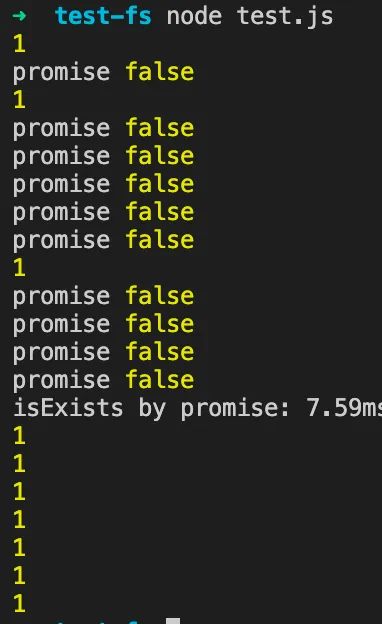
Sync Approach Result
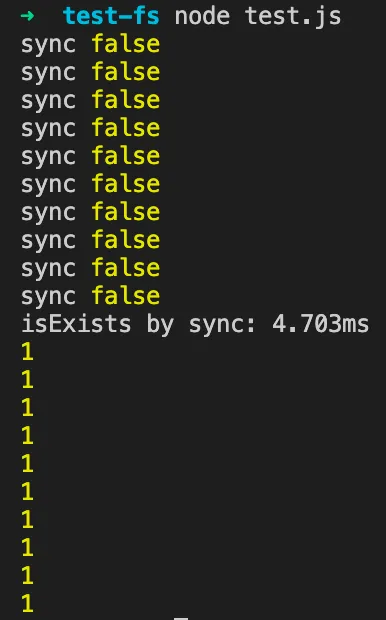
Performance Comparison
Here we can see that the sync approach is blocking.
That is, although sync takes less time to process files,
it blocks all subsequent operations until sync completes.
Simply put, it “reduces processing time and optimizes JS writing”
at the cost of monopolizing the Node.js process and blocking other operations.
Summary
In terms of process occupation: ( callback < promise ) << sync
High-Performance FS
In web frontend or Node.js development,
frequent use of fs is relatively rare.
It is generally used in scenarios like uploading and downloading.
However, when developing desktop applications with Electron,
fs operations become very frequent.
In that case, you need to focus on using fs with high performance.
Callback Approach
1. Writing leads to callback hell
2. Embodies Node.js event-driven, non-blocking IO
3. Best performance
Promise Approach
1. Writing requires async / await
2. Also embodies event-driven, non-blocking IO
3. Performance is very close to callback, with slight overhead
Sync Approach
1. Simplest to write, no async / await needed
2. Blocking usage
3. Very poor performance, use with caution
Summary
1. For simple scenarios where minimal time is desired, you can use the sync approach
2. For all other scenarios, use sync with caution and prefer the promise approach