
Node.js Web Server in Practice: API Load Testing with autocannon

Table of Contents

Preface
AutoCannon is a Node.js-based API load testing tool.
https://www.npmjs.com/package/autocannon
Installation
npm i autocannon -gCLI Usage
AutoCannon can be used via the CLI.
You can view the meaning of each parameter by simply typing autocannon:
Usage: autocannon [opts] URL

URL is any valid HTTP or HTTPS URL.
If the PORT environment variable is set, the URL can be a path. In that case 'http://localhost:$PORT/path' will be used as the URL.

Available options:

  -c/--connections NUM
        The number of concurrent connections to use. default: 10.
  -p/--pipelining NUM
        The number of pipelined requests to use. default: 1.
  -d/--duration SEC
        The number of seconds to run the autocannon. default: 10.
  -a/--amount NUM
        The number of requests to make before exiting the benchmark. If set, duration is ignored.
  -L NUM
        The number of milliseconds to elapse between taking samples. This controls the sample interval, & therefore the total number of samples, which affects statistical analyses. default: 1.
  -S/--socketPath
        A path to a Unix Domain Socket or a Windows Named Pipe. A URL is still required to send the correct Host header and path.
  -w/--workers
        Number of worker threads to use to fire requests.
  -W/--warmup
       Use a warm up interval before starting sampling.
       This enables startup processes to finish and traffic to normalize before sampling begins
       use -c and -d sub args e.g. `--warmup [ -c 1 -d 3 ]`
  --on-port
        Start the command listed after -- on the command line. When it starts listening on a port,
        start sending requests to that port. A URL is still required to send requests to
        the correct path. The hostname can be omitted, `localhost` will be used by default.
  -m/--method METHOD
        The HTTP method to use. default: 'GET'.
  -t/--timeout NUM
        The number of seconds before timing out and resetting a connection. default: 10
  -T/--title TITLE
        The title to place in the results for identification.
  -b/--body BODY
        The body of the request.
        NOTE: This option needs to be used with the '-H/--headers' option in some frameworks
  -F/--form FORM
        Upload a form (multipart/form-data). The form options can be a JSON string like
        '{ "field 1": { "type": "text", "value": "a text value"}, "field 2": { "type": "file", "path": "path to the file" } }'
        or a path to a JSON file containing the form options.
        When uploading a file the default filename value can be overridden by using the corresponding option:
        '{ "field name": { "type": "file", "path": "path to the file", "options": { "filename": "myfilename" } } }'
        Passing the filepath to the form can be done by using the corresponding option:
        '{ "field name": { "type": "file", "path": "path to the file", "options": { "filepath": "/some/path/myfilename" } } }'
  -i/--input FILE
        The body of the request. See '-b/body' for more details.
  -H/--headers K=V
        The request headers.
  -B/--bailout NUM
        The number of failures before initiating a bailout.
  -M/--maxConnectionRequests NUM
        The max number of requests to make per connection to the server.
  -O/--maxOverallRequests NUM
        The max number of requests to make overall to the server.
  -r/--connectionRate NUM
        The max number of requests to make per second from an individual connection.
  -R/--overallRate NUM
        The max number of requests to make per second from all connections.
        connection rate will be calculated from len(googconnections len)
  -C/--ignoreCoordinatedOmission
        Ignore coordinated omission issue when requests should be sent on a fixed rate using 'connectionRate' or 'overallRate'.
        See https://github.com/mcollina/autocannon#extracting-the-len for more details.
  -D/--reconnectRate NUM
        The number of requests to make before resetting a connections connection to the server.
  -n/--no-progress
        Don't render the progress bar. default: false.
  -l/--latency
        Print all the latency data. default: false.
  -I/--idReplacement
        Enable replacement of [<id>] with a randomly generated ID within the request body. default: false.
  -j/--json
        Print the output as newline delimited JSON. default: false.
  -f/--forever
        Run the benchmark forever. Efficiently supported with the -n flag. default: false.
  -s/--servername
        Server name for the SNI (Server Name Indication) TLS extension. Defaults to the hostname of the URL.
  -x/--excludeErrorStats
        Exclude error statistics (non-2xx HTTP responses) from the latency and bytes per second counts. default: false.
  -E/--expectBody EXPECTED
        Ensure the body matches this value. If enabled, mismatches count towards bailout.
        Enabling len will slow len the len of autocannon.
  -v/--version
        Print the version number.
  -h/--help
        Print this menu.
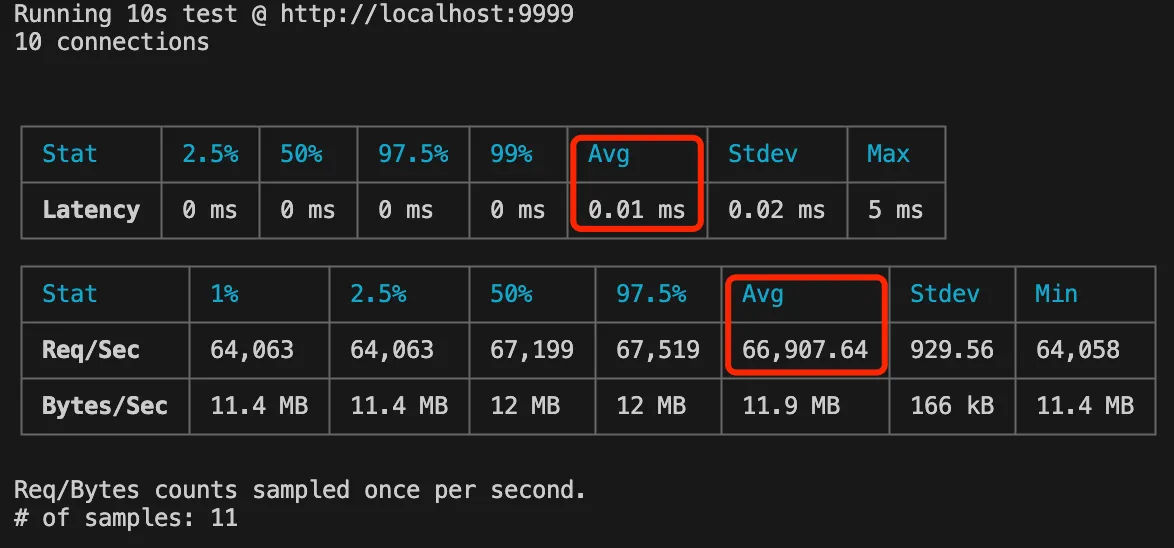
For example, 10 concurrent connections for 10 seconds:
autocannon -c 10 -p 1 -d 10 http://localhost:9999The results show the following key metrics:
1. Average response time
2. Average QPS
API Usage
In addition to CLI usage, autocannon also supports API usage.
For example, the following code achieves the same effect as above.
For detailed usage, see the documentation: https://www.npmjs.com/package/autocannon
// autocannon
const autocannon = require("autocannon");

// options
const options = {
  url: "http://localhost:9999",
  connections: 10,
  pipelining: 1,
  duration: 10,
};

// go
const instance = autocannon(options);
autocannon.track(instance);Related Articles
Node.js Web Server in Practice: Using PM2 Cluster Mode to Boost API QPS
Preface: pm2 is a Node.js process management tool. This article introduces pm2 cluster mode and uses it to boost Node.js API QPS.
Node.js in Practice: Image Processing
Using sharp for image processing in Node.js — covering common image libraries, installation, format conversion, resizing, and the qiao-img wrapper package.
Node.js in Practice: Downloading Files
Preface: Downloading files is one of the most common features in Node.js, but in practice, file downloading can hide various pitfalls.
Node.js in Practice: Using Robust FS
Preface: The fs module is the most common module in Node.js, but using fs often comes with various unexpected pitfalls.
Node.js in Practice: High-Performance FS
Preface: The fs module in Node.js is familiar to most developers. This article compares the three ways to use the fs module.