
Node.js in Practice: Downloading Files

Preface
Downloading files is one of the most common features in Node.js,
but in practice, file downloading can hide various pitfalls.
Original Code
If you search for Node.js file download code online,
you will likely find a code snippet similar to the following.
This article starts from here and progressively optimizes the file download functionality.
const http = require('http');
const https = require('https');
const fs = require('fs');

function downloadFile(url, dest) {
  let protocol = url.startsWith('https') ? https : http;
  let file = fs.createWriteStream(dest);
  protocol
    .get(url, (res) => {
      res.pipe(file);
      file.on('finish', () => {
        file.close();
        console.log('Download complete.');
      });
    })
    .on('error', (err) => {
      fs.unlink(dest);
      console.error(`Download failed: ${err.message}`);
    });
}
The code snippet above shows:
1. Compatibility with Node.js native http and https requests
2. After getting the URL content via a GET request, it pipes to a local file write stream
3. Request errors are caught, and the downloaded file is deleted on error
Validating URL Legitimacy
As you can see, the code above uses the URL directly.
In practice, the URL’s legitimacy should be validated first.
The code is as follows:
// url
import { URL } from 'url';

/**
 * check url
 * @param {*} checkUrl
 * @returns
 */
export const checkUrl = (inputUrl) => {
  // check
  if (!inputUrl) return;

  // check url
  const url = new URL(inputUrl);
  if (!url) return;

  // check protocol
  return url.protocol === 'http:' || url.protocol === 'https:';
};
Here, Node.js’s native url module is used for validation.
Validating Destination Path Legitimacy
Similarly, the code above uses the destination path directly.
Some validation should also be performed here.
The code is as follows:
// fs
import { path, mkdir } from 'qiao-file';

/**
 * check dest
 * @param {*} dest
 * @returns
 */
export const checkDest = async (dest) => {
  // check dest
  if (!dest) return;

  // absolute dest
  const destIsAbsolute = path.isAbsolute(dest);
  if (!destIsAbsolute) dest = path.resolve(__dirname, dest);

  // mkdir
  const dir = path.dirname(dest);
  const mkdirRes = await mkdir(dir);
  if (!mkdirRes) return;

  // return
  return dest;
};
1. This handles the case where dest is a relative path
2. And automatically creates the folder if dest’s directory does not exist
The code after adding URL and dest validation is as follows:
// http
import http from 'http';
import https from 'https';

// fs
import { fs } from 'qiao-file';

// check
import { checkUrl } from './check-url.js';
import { checkDest } from './check-dest.js';

/**
 * download
 * @param {*} url
 * @param {*} dest
 * @returns
 */
export const download = async (url, dest) => {
  // check url
  if (!checkUrl(url)) return Promise.reject(new Error('url is not valid'));

  // check dest
  const newDest = await checkDest(dest);
  if (!newDest) return Promise.reject(new Error('dest is not valid'));

  // p and file
  const file = fs.createWriteStream(newDest);
  const protocol = url.startsWith('https') ? https : http;

  //
  return new Promise((resolve, reject) => {
    protocol
      .get(url, (res) => {
        // pipe
        res.pipe(file);

        // file
        file.on('finish', () => {
          file.close();

          resolve(newDest);
        });
        file.on('error', (err) => {
          fs.unlink(newDest);
          reject(err);
        });
      })
      .on('error', (err) => {
        fs.unlink(newDest);
        reject(err);
      });
  });
};
Validating File Stream Errors
In the code above, the file stream write error listener
is placed after res.pipe.
If writing to a path without permissions,
an uncaught exception will be thrown.
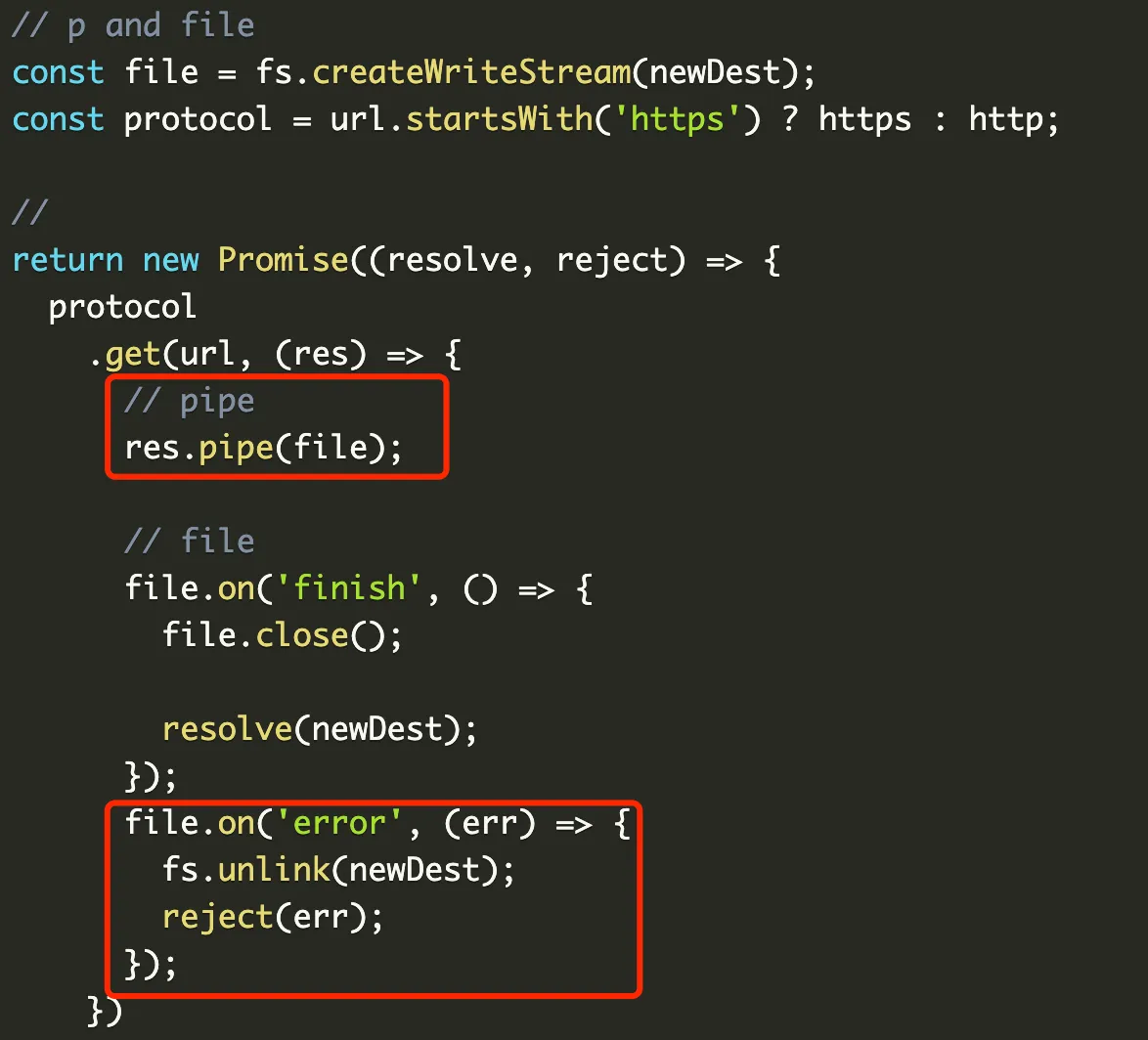
The fix is as follows:
return new Promise((resolve, reject) => {
  // file write stream
  const file = fs.createWriteStream(newDest);
  file.on('error', (err) => {
    reject(err);
  });
  file.on('finish', () => {
    file.close();
    resolve(newDest);
  });

  // get
  const protocol = url.startsWith('https') ? https : http;
  protocol
    .get(url, (res) => {
      // pipe
      res.pipe(file);
    })
    .on('error', (err) => {
      fs.unlink(newDest);
      reject(err);
    });
});
Validating Request Errors
The code above does not validate request errors.
For example, if the response code is not 200,
it won’t trigger the error listener,
but will download an incorrect file instead.
The fix is as follows:
// get
const protocol = url.startsWith('https') ? https : http;
protocol
  .get(url, (res) => {
    // check res
    if (!res || res.statusCode !== 200) {
      return reject(new Error('response status code is not 200'));
    }

    // pipe
    res.pipe(file);
  })
  .on('error', async (err) => {
    await rm(newDest);
    reject(err);
  });
Setting Timeout
Next, let’s set the download timeout.
This is not as simple as setting the timeout directly on the request.
The timeout property in Node.js’s http module
represents the connection establishment timeout.
For example, setting timeout to 100ms
means the connection establishment exceeds 100ms,
not that the entire download process exceeds 100ms.
This needs to be implemented manually.
The code is as follows:
// timeout
let timeoutId;
if (timeout) {
  timeoutId = setTimeout(() => {
    if (res) res.destroy();
    clearFile(newDest);
    reject(new Error('timeout'));
  }, timeout);
}

const file = fs.createWriteStream(newDest);
file.on('error', (err) => {
  clearTimeoutFn(timeoutId, timeout);
  reject(err);
});
file.on('finish', () => {
  file.close();

  clearTimeoutFn(timeoutId, timeout);
  resolve(newDest);
});

// pipe
res.pipe(file);
1. First, if a timeout parameter is passed, start the timeout
2. If completed early, clear the timeout
3. If not completed in time, clean up the file and return an error
Validating File Integrity
After downloading a file, its integrity should be validated.
Here we simply check the file size.
The code is as follows:
export const checkFileSize = (res, dest) => {
  // check
  if (!res || !dest) return;

  // res length
  const resLength = res.headers['content-length'];
  if (!resLength) return;

  // fs length
  try {
    const s = fs.statSync(dest);
    if (!s || !s.size) return;

    return parseInt(resLength, 10) === s.size;
  } catch (error) {
    debug(error);
  }
};
Download Progress
During file download,
real-time feedback on download progress is also important.
This can be achieved by listening to the data event on res.
The code is as follows:
// data
let data = 0;

/**
 * on progress
 * @param {*} res
 * @param {*} onProgress
 * @returns
 */
export const onDownloadProgress = (res, onProgress) => {
  // check res
  if (!res) return;

  // check progress
  if (!onProgress) return;

  // check content
  const contentLength = res.headers['content-length'];
  if (!contentLength) return;

  // total
  const total = parseInt(contentLength, 10);

  // on data
  res.on('data', (chunk) => {
    data = data + chunk.length;

    const p = (data / total).toFixed(3);
    const n = parseFloat(p);
    onProgress(n);
  });
};
qiao-downloader
Here is a packaged npm module for convenience:
https://www.npmjs.com/package/qiao-downloader
1. Basic file download capability
2. Request error validation
3. File stream error validation
4. Custom timeout capability
5. File size validation after download
6. Download progress callback support