
Standardized Code Commits: Conventional Commits

Preface
This article introduces how to submit standardized commit messages.
For the commit message specification, see this website: https://www.conventionalcommits.org/en/v1.0.0/
commitizen
You can manually submit commit messages that follow the spec, like this
git commit -m "fix: fix click button bug..."Manually writing spec-compliant messages is tedious,
so you can use the commitizen tool,
https://www.npmjs.com/package/commitizen
Install commitizen
npm install -g commitizenInstall the corresponding convention
npm i -D cz-conventional-changelog
echo '{ "path": "cz-conventional-changelog" }' > .czrc
Use git cz instead of git commit -m to submit commits. The result looks like this
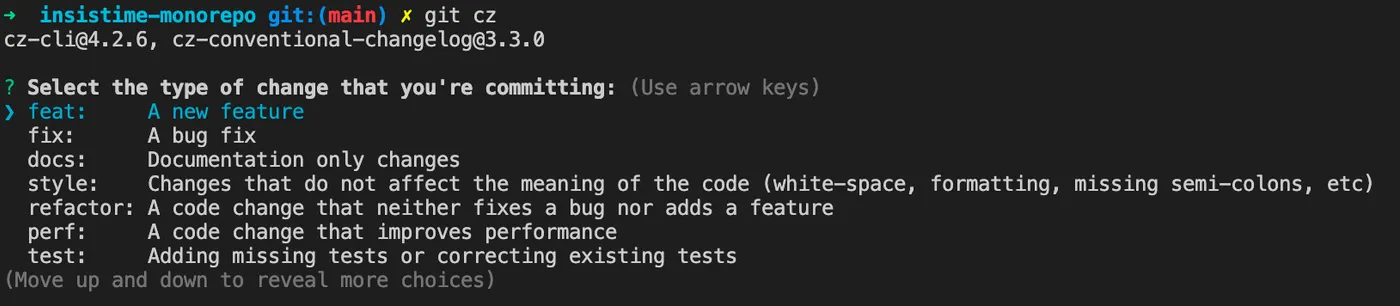
Now you can interactively submit spec-compliant commit messages.
commitlint+husky
Although commitizen is installed,
and you can use git cz to submit spec-compliant commit messages,
you cannot enforce that others also use git cz.
This is where commitlint comes in for validation.
https://github.com/conventional-changelog/commitlint
However, commitlint only validates whether a commit message follows the spec.
It cannot automatically check every commit message on its own.
This is where husky, a git hooks tool, is needed.
https://typicode.github.io/husky/#/
Install husky
npm i -D huskyRegister git hooks
npx husky installAdd a script to package.json so that git hooks are registered during prepare
npm pkg set scripts.prepare="husky install"Install commitlint
npm install --save-dev @commitlint/config-conventional @commitlint/cliAdd commitlint to the git hook
npx husky add .husky/commit-msg 'npx --no -- commitlint --edit "$1"'Add the commit convention config
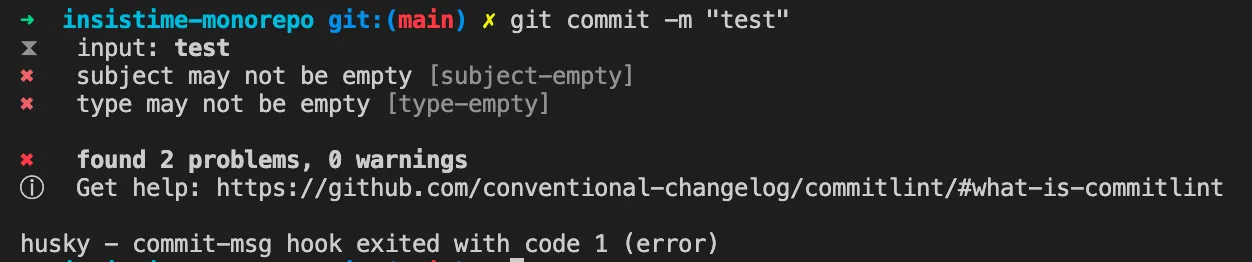
echo "module.exports = {extends: ['@commitlint/config-conventional']};" > commitlint.config.jsNow, when using a regular git commit -m with a non-compliant message, you will see the following prompt
lerna
If your project is managed with lerna,
after the above configuration, lerna publish will fail.
You need to configure the lerna.json file as follows
{
  "packages": ["packages/*"],
  "version": "independent",
  "command": {
    "publish": {
      "allowBranch": "master",
      "message": "chore(release): publish"
    }
  }
}
lint-staged
If you want to add other checks via husky, such as eslint,
you can use the lint-staged tool.
https://www.npmjs.com/package/lint-staged
lint-staged combined with husky can run checks before each commit.
Install lint-staged
npm install --save-dev lint-stagedAdd a pre-commit hook using husky
npx husky add .husky/pre-commit "npx lint-staged"Create a lint-staged config file .lintstagedrc.js in the project root
module.exports = {
  '*.js': 'npm run lint',
};
The content can be customized with your own checks.
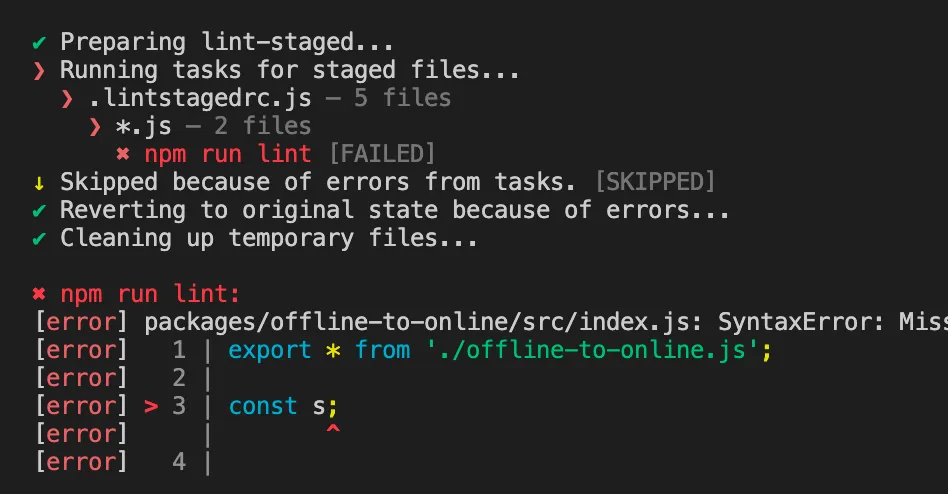
After configuration, your configured lint operations will run before each commit, for example
Summary
1.Submit spec-compliant commit messages, https://www.conventionalcommits.org/en/v1.0.0/
2.Use the commitizen tool to submit spec-compliant commit messages, https://www.npmjs.com/package/commitizen
3.Use commitlint to validate whether commit messages follow the spec, https://github.com/conventional-changelog/commitlint
4.Use husky to register a git hook that runs commitlint before each commit, https://typicode.github.io/husky/#/
5.If using lerna to manage the project, modify the lerna.json file
6.Use lint-staged to run lint checks before each commit, https://www.npmjs.com/package/lint-staged
Here is a summary of the entire workflow:
# Install commitizen. After installation, use git cz instead of git commit to submit conventional commits
npm i -g commitizen

# Tell commitizen which convention to use
npm i -D cz-conventional-changelog
echo '{ "path": "cz-conventional-changelog" }' > .czrc

# Install husky. After installation, you can configure git hooks via husky
npm i -D husky

# Register husky
npx husky install

# Add husky's prepare script so that other users automatically register husky after running npm i
npm pkg set scripts.prepare="husky install"

# The above command is not supported in some npm versions. You can manually add the following script to package.json
"prepare": "husky install",

# Install commitlint
npm i -D @commitlint/config-conventional @commitlint/cli

# Add commitlint git hook via husky
npx husky add .husky/commit-msg 'npx --no -- commitlint --edit "$1"'

# Add commitlint.config.js config file
echo "module.exports = {extends: ['@commitlint/config-conventional']};" > commitlint.config.js

# At this point, commitizen is added for convenient conventional commits via git cz
# husky+commitlint git hook is added to block non-compliant commits

# If using lerna, modify lerna.json
{
  "packages": ["packages/*"],
  "version": "independent",
  "command": {
    "publish": {
      "allowBranch": "master",
      "message": "chore(release): publish"
    }
  }
}

# If using lint-staged, follow these steps
npm install --save-dev lint-staged
npx husky add .husky/pre-commit "npx lint-staged"

# lint-staged config file .lintstagedrc.js
module.exports = {
  '*.js': 'npm run lint',
};