
Electron - Development Practice: Local Database SQLite

Preface
Some common methods for local data storage include Cookie, LocalStorage, IndexedDB, SQLite, etc.
Here is a brief comparison:
Cookie
|—Storage size: 4k
|—Set expiration: Yes
|—Server-side access: Yes
|—Feature: Simple data storage
LocalStorage
|—Storage size: 5M
|—Set expiration: No
|—Server-side access: No
|—Feature: Local key-value storage
IndexedDB
|—Storage size: 250M+
|—Set expiration: No
|—Server-side access: No
|—Feature: Non-relational database
SQLite
|—Storage size: Unlimited
|—Set expiration: No
|—Server-side access: No
|—Feature: Local relational database
Here are two recommended articles that introduce LocalStorage and IndexedDB respectively:
Learn LocalStorage in One Article
Learn IndexedDB in One Article
SQLite
SQLite is a well-known local relational database. Official website: https://www.sqlite.org/index.html
SQLite supports various operating systems including Linux, Mac, Windows, Android, etc. Download: https://www.sqlite.org/download.html
There is also a corresponding npm package available, sqlite3: https://www.npmjs.com/package/sqlite3
Installation
// install
npm i sqlite3

// m1
npm i sqlite3 --target_arch=arm64
Getting Started
After installation, run the sample code from the official website:
const sqlite3 = require('sqlite3').verbose();
const db = new sqlite3.Database(':memory:');

db.serialize(function () {
  db.run('CREATE TABLE lorem (info TEXT)');

  const stmt = db.prepare('INSERT INTO lorem VALUES (?)');
  for (var i = 0; i < 10; i++) {
    stmt.run('Ipsum ' + i);
  }
  stmt.finalize();

  db.each('SELECT rowid AS id, info FROM lorem', function (err, row) {
    console.log(row.id + ': ' + row.info);
  });
});

db.close();
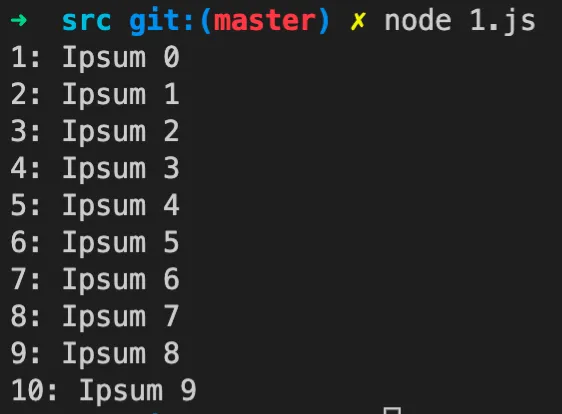
The logic of the above code:
-
Create a database (this one is special — it’s in memory)
-
Create a table
-
Insert data
-
Query data
Execution result:
Documentation
SQLite documentation: https://www.sqlite.org/docs.html
|—Supported data types: https://www.sqlite.org/datatype3.html
|—Create table: https://www.sqlite.org/lang_createtable.html
|—Alter table: https://www.sqlite.org/lang_altertable.html
|—Create view: https://www.sqlite.org/lang_createview.html
|—Drop table: https://www.sqlite.org/lang_droptable.html
|—Insert data: https://www.sqlite.org/lang_insert.html
|—Select data: https://www.sqlite.org/lang_select.html
|—Delete data: https://www.sqlite.org/lang_delete.html
npm-sqlite3 documentation: https://github.com/TryGhost/node-sqlite3/wiki/API
qiao-sqlite
For convenience, a wrapper npm package was created: https://code.insistime.com/#/qiao-sqlite
createDB
Create a database
'use strict';

// q
const q = require('qiao-sqlite');

// db
const db = q.createDB('./test/test.db');
console.log(db);
createTable
Create a table
'use strict';

// q
const q = require('qiao-sqlite');

// db
const db = q.createDb('./__tests__/test.db');

// table
const sql = 'CREATE TABLE if not exists t_project (project_name TEXT, project_appid TEXT, project_icon_url TEXT)';

// test
async function test() {
  try {
    await q.createTable(db, sql);
  } catch (e) {
    console.log(e);
  }
}

// run
test();
showTables
List tables
'use strict';

// q
const q = require('qiao-sqlite');

// db
const db = q.createDB('./__tests__/test.db');

// test
async function test() {
  try {
    const rows = await q.showTables(db);
    console.log(rows);
  } catch (e) {
    console.log(e);
  }
}

// run
test();
dropTable
Drop a table
'use strict';

// q
const q = require('qiao-sqlite');

// db
const db = q.createDB('./__tests__/test.db');

// test
async function test() {
  try {
    console.log(await q.showTables(db));
    await q.dropTable(db, 't_project');
    console.log(await q.showTables(db));
  } catch (e) {
    console.log(e);
  }
}

// run
test();
insertData
Insert data
'use strict';

// q
const q = require('qiao-sqlite');

// db
const db = q.createDB('./__tests__/test.db');

// data
const sql = 'insert into t_project values (?, ?, ?)';

// test
async function test() {
  try {
    await q.insertData(db, sql, ['name', 'appid', 'url']);
  } catch (e) {
    console.log(e);
  }
}

// run
test();
deleteData
Delete data
'use strict';

// q
const q = require('qiao-sqlite');

// db
const db = q.createDB('./__tests__/test.db');

// data
const sql = 'delete from t_project where rowid=?';

// test
async function test() {
  try {
    await q.deleteData(db, sql, [1]);
  } catch (e) {
    console.log(e);
  }
}

// run
test();
modifyData
Modify data
'use strict';

// q
const q = require('qiao-sqlite');

// db
const db = q.createDB('./__tests__/test.db');

// data
const sql = 'update t_project set project_name=?';

// test
async function test() {
  try {
    await q.modifyData(db, sql, ['name1']);
  } catch (e) {
    console.log(e);
  }
}

// run
test();
selectData
Query data
'use strict';

// q
const q = require('qiao-sqlite');

// db
const db = q.createDB('./__tests__/test.db');

// sql
const sql = 'SELECT rowid,* FROM t_project';

// test
async function test() {
  try {
    const rows = await q.selectData(db, sql);
    console.log(rows);
  } catch (e) {
    console.log(e);
  }
}

// run
test();
Practice
SQLite is commonly used in large Android/iOS applications or desktop applications.
Here we’ll do a practice exercise in an Electron environment.
Related project articles:
Learn LocalStorage in One Article
Learn Webpack 5.x in One Article
Build a Todo List in One Article
Learn IndexedDB in One Article
Here we’ll build a todo list using Electron + sqlite3 based on the above.
Wrap SQLite Methods in the Main Process
Electron is divided into the main process and the renderer process.
SQLite must be used in the main process.
The renderer process calls the main process’s wrapped SQLite methods via IPC communication.
Since IPC communication is needed, the SQLite-related methods are wrapped as follows:
'use strict';

// path
const path = require('path');

// electron
const { app } = require('electron');

// sqlite
const {
  createDb,
  createTable,
  dropTable,
  showTables,
  insertData,
  modifyData,
  deleteData,
  selectData,
} = require('qiao-sqlite');

// json
const { success, danger } = require('qiao-json');

/**
 * sqlite
 * @returns
 */
exports.sqlite = () => {
  const userDataPath = app.getPath('userData');
  const dbPath = path.resolve(userDataPath, './electron.db');
  const db = createDb(dbPath);

  return db;
};

/**
 * dbCreateTable
 * @param {*} sql
 * @returns
 */
exports.dbCreateTable = async (sql) => {
  // check
  if (!sql) return danger('need create table sql');

  // db
  const db = exports.sqlite();

  // create table
  try {
    await createTable(db, sql);
    return success('create table success');
  } catch (e) {
    // return danger('create table fail', e);
    return success('create table success');
  }
};

/**
 * dbDropTable
 * @param {*} tableName
 * @returns
 */
exports.dbDropTable = async (tableName) => {
  // check
  if (!tableName) return danger('need tableName');

  // db
  const db = exports.sqlite();

  // drop table
  try {
    await dropTable(db, tableName);
    return success('drop table success');
  } catch (e) {
    return success('drop table success');
  }
};

/**
 * dbShowTables
 * @returns
 */
exports.dbShowTables = async () => {
  // db
  const db = exports.sqlite();

  // show tables
  try {
    const rows = await showTables(db);
    return success('show table success', rows);
  } catch (e) {
    return success('show table success');
  }
};

/**
 * dbInsertData
 * @param {*} sql
 * @param {*} params
 * @returns
 */
exports.dbInsertData = async (sql, params) => {
  // check
  if (!sql) return danger('need insert data sql');

  // db
  const db = exports.sqlite();

  // insert data
  try {
    await insertData(db, sql, params);
    return success('insert data success');
  } catch (e) {
    return danger('insert data fail', e);
  }
};

/**
 * dbDeleteData
 * @param {*} sql
 * @param {*} params
 * @returns
 */
exports.dbDeleteData = async (sql, params) => {
  // check
  if (!sql) return danger('need delete data sql');

  // db
  const db = exports.sqlite();

  // delete data
  try {
    await deleteData(db, sql, params);
    return success('delete data success');
  } catch (e) {
    return danger('delete data fail', e);
  }
};

/**
 * dbModifyData
 * @param {*} sql
 * @param {*} params
 * @returns
 */
exports.dbModifyData = async (sql, params) => {
  // check
  if (!sql) return danger('need modify data sql');

  // db
  const db = exports.sqlite();

  // modify data
  try {
    await modifyData(db, sql, params);
    return success('modify data success');
  } catch (e) {
    return danger('modify data fail', e);
  }
};

/**
 * dbSelectData
 * @param {*} sql
 * @param {*} params
 * @returns
 */
exports.dbSelectData = async (sql, params) => {
  // check
  if (!sql) return danger('need select data sql');

  // db
  const db = exports.sqlite();

  // select data
  try {
    const rows = await selectData(db, sql, params);
    return success('select data success', rows);
  } catch (e) {
    return danger('select data fail', e);
  }
};
Main Process IPC Listener
After wrapping SQLite in the main process, listen for IPC communication and call the corresponding SQLite methods.
Here’s an example of listening for the create table method:
'use strict';

// electron
const { ipcMain } = require('electron');

// sqlite
const { dbCreateTable } = require('./sqlite-main.js');

// const
const { IPC_SQLITE_CREATE_TABLE } = require('../../_util/constant.js');

/**
 * ipc sqlite create table
 */
ipcMain.handle(IPC_SQLITE_CREATE_TABLE, (sql) => {
  return dbCreateTable(sql);
});
Inject Preload in the Renderer Process
The renderer process needs a preload file injected to call main process methods.
Here the IPC communication method is injected:
'use strict';

// electron
const { ipcRenderer } = require('electron');

// const
const { IPC_SQLITE_CREATE_TABLE } = require('../../_util/constant.js');

/**
 * createTableIPC
 */
exports.createTableIPC = async () => {
  return await ipcRenderer.invoke(IPC_SQLITE_CREATE_TABLE);
};
Call IPC Methods from the Renderer Process
After injecting the preload, you can call IPC methods from the renderer process.
In this project, the dishi-web folder calls the IPC method:
const sql = 'CREATE TABLE if not exists t_project (project_name TEXT, project_appid TEXT, project_icon_url TEXT) ';
const rs = await window.electron.createTableIPC(sql);
console.log(rs);
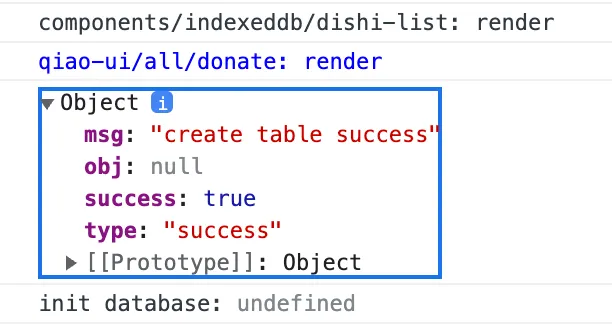
Final Result
-
JavaScript in the renderer process calls the IPC method
-
The IPC method is provided by the preload file injected when creating the window
-
The main process listens for IPC calls and executes the corresponding SQLite method
As shown below:
Refinement
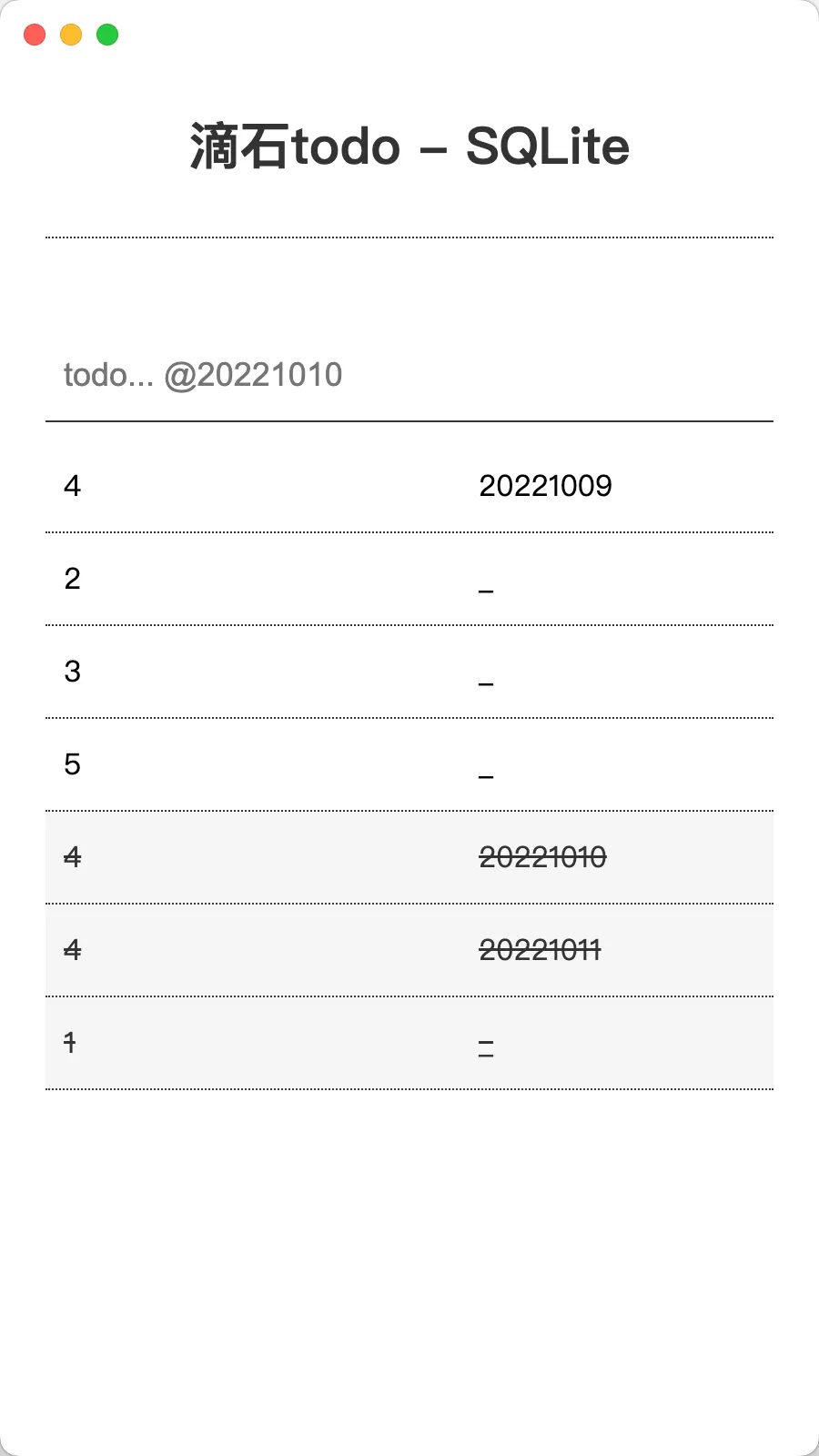
Following the steps above, continue refining the SQLite-based todo list:
-
Create database and table
-
Add todo
-
Delete todo
-
Add done
-
Query todo
-
Query done
Result:
Full code available at: https://github.com/uikoo9/dishi-monorepo/tree/sqlite
Summary
-
SQLite - Comparison of Cookie, LocalStorage, IndexedDB, and SQLite
-
SQLite - Introduction to SQLite
-
SQLite - SQLite documentation
-
SQLite - sqlite3 installation and getting started
-
SQLite - sqlite3 utility: qiao-sqlite, https://code.insistime.com/#/qiao-sqlite
-
SQLite - Another article: https://uikoo9.blog.csdn.net/article/details/123924787
-
SQLite - Practice Electron + SQLite project: https://github.com/uikoo9/dishi-monorepo/tree/sqlite