
StableDiffusionWebUI: LoRA

Table of Contents

Preface
If checkpoint determines the main effect and style of your generated images,
and embeddings mainly serve as negative prompts to avoid undesirable effects,
then LoRA is for fine-tuning to achieve the specific effect you want.
Using LoRA
Installation
Place the downloaded LoRA files into the stable-diffusion-webui/models/Lora directory.
If they don’t appear, click the refresh button on the right side to reload.
Usage
Click on a LoRA under the LoRA tab to use it.
LoRA - Effect
If checkpoint determines the style — whether realistic, cartoon, or something else —
then LoRA determines the content or details.
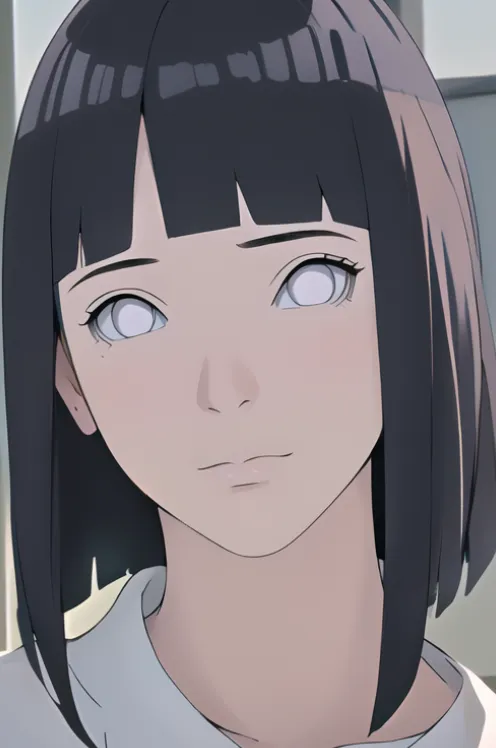
For example, using the same prompts and parameters as before,
if I want to draw Hinata from Naruto,
I would need a Hinata LoRA.
Positive Prompt
(best quality:1), (high quality:1), detailed/(extreme, highly, ultra/), realistic, 1girl/(beautiful, delicate, perfect/)
Sampler
DPM++ 2M
Sampling Steps
20
Seed
1199889759
Checkpoint
anythingv5nijimix
LoRA-hinata
Link: https://civitai.com/models/58066/hinata-hinata-hyuga-boruto-naruto-next-generations
Add to prompt: hinata\(boruto\), lora:Hinata\[boruto\]V2:0.8
Summary
In short, Checkpoint determines the style, and LoRA determines the details~
SDWebUI
|—Link: https://sdwebui.ai/?from=vq
|—Authentic Stable Diffusion WebUI V1.10.1~
|—Top-tier 4090 GPU, premium members get exclusive single 4090 card for image generation~
|—Supports Mac client, Windows client, and Web online usage~
|—Innovative instant model transfer feature, instantly use local models~
|—Supports txt2img, img2img, extras, and PNG info
|—Supports CLIP interrogation and DeepBooru interrogation
|—Supports Hires.fix with 21 built-in upscaling models
|—Supports ADetailer with 11 built-in repair models
|—Supports ControlNet with 44 built-in preprocessors and 68 built-in models
|—Supports super-resolution upscaling (Tiled Diffusion, Demo Fusion, Tiled VAE)
|—Supports old photo restoration with 21 built-in upscaling models, plus GFPGAN and CodeFormer restoration models
|—Built-in 2 common Styles, 11 popular Checkpoint models, 7 popular LoRA models, 14 common embeddings
|—Built-in oldsix prompt plugin
|—Built-in 23-lesson beginner tutorial
Related Articles
sdwebui.ai - Ready-to-Use Native sdwebui
sdwebui.ai sdwebui.ai is a ready-to-use native online sdwebui. URL: https://www.sdwebui.ai/ Authentic Stable Diffusion WebUI V1.10.1 Top-tier 4090 GPU, premium members get exclusive single 4090 for image generation Supports Mac client, Windows client, and Web online usage
StableDiffusionWebUI: Detail Repair (ADetailer)
Using ADetailer to fix facial and hand details in Stable Diffusion — installation, usage, parallel repair, and model comparison.
SodaArt - Restore Old Photos in Three Steps
Environment Setup Open https://sodaart.ai/, download the Mac or Windows client, install and open it locally, or click Online Generation to open the web version directly. Step 1: Log in to the homepage Use your phone number + verification code to log in, then click Online Generation. Step 2: Upload old photos in the Extras tab Under Online Generation - Extras tab, upload your old photos. Step 3: Configure
StableDiffusionWebUI: Old Photo Restoration (GFPGAN)
Preface: One of the use cases for sdwebui is old photo restoration. Common old photo restoration tools existed before sdwebui, including GFPGAN and CodeFormer. However, combining them with Hires.fix in sdwebui yields even better results.
StableDiffusionWebUI: Image Info (PNG Info)
Preface: PNG Info is a built-in feature of sdwebui that is essential in everyday image generation workflows. It allows you to upload an image, read its meta information, parse the generation parameters, and conveniently send them to other features like txt2img, img2img, and inpainting.