
StableDiffusionWebUI: Mac Installation
Preface
Currently there are several common approaches for AIGC image generation:
-
SD image generation
-
Midjourney image generation: https://www.midjourney.com/home
-
Other large model image generation
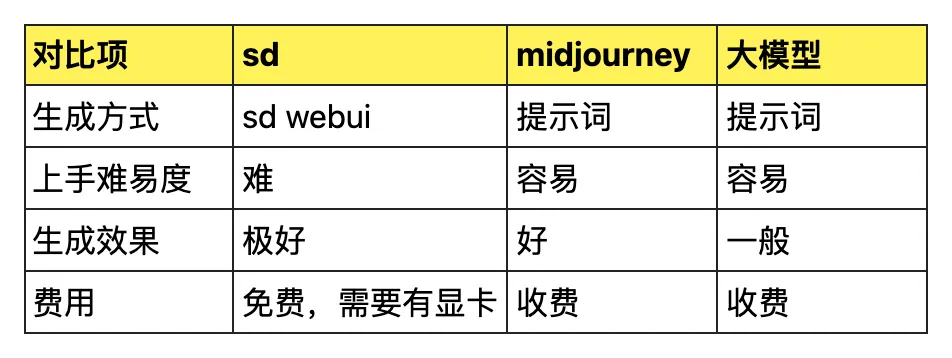
Here is a brief comparison across several dimensions:
SD Introduction
There are 3 SD-related projects on GitHub:
https://github.com/CompVis/stable-diffusion
https://github.com/Stability-AI/stablediffusion
https://github.com/AUTOMATIC1111/stable-diffusion-webui
The first one is V1, which is currently the most widely used version.
The second one is V2, which is used less frequently.
The third one is a WebUI for V1 developed by the community.
The first two don’t have a UI interface. Generally, the third one with a WebUI is used.
Mac Installation
Mac installation guide for sd-webui: https://github.com/AUTOMATIC1111/stable-diffusion-webui/wiki/Installation-on-Apple-Silicon
Install Homebrew
Since sd-webui depends on many third-party packages, it is recommended to install Homebrew for Mac first.
Link: https://brew.sh/
Since Homebrew downloads from overseas servers,
it is recommended to configure a proxy for much faster speeds.
export https_proxy=http://127.0.0.1:7890
export http_proxy=http://127.0.0.1:7890
Install Dependencies
After installing Homebrew, install the sd-webui dependencies:
brew install cmake protobuf rust python@3.10 git wgetClone the Project
Clone the sd-webui project:
git clone https://github.com/AUTOMATIC1111/stable-diffusion-webuiDownload Image Generation Models
Download the desired image generation models to this location:
stable-diffusion-webui/models/Stable-diffusionRecommended models for beginners: https://github.com/AUTOMATIC1111/stable-diffusion-webui/wiki/Installation-on-Apple-Silicon#downloading-stable-diffusion-models
Launch WebUI
cd stable-diffusion-webui
./webui.sh
pip Proxy
The startup process requires installing Python dependencies,
which can also be slow. It is recommended to configure a proxy.
export HTTPS_PROXY=http://127.0.0.1:7890
export HTTP_PROXY=http://127.0.0.1:7890
sd-webui
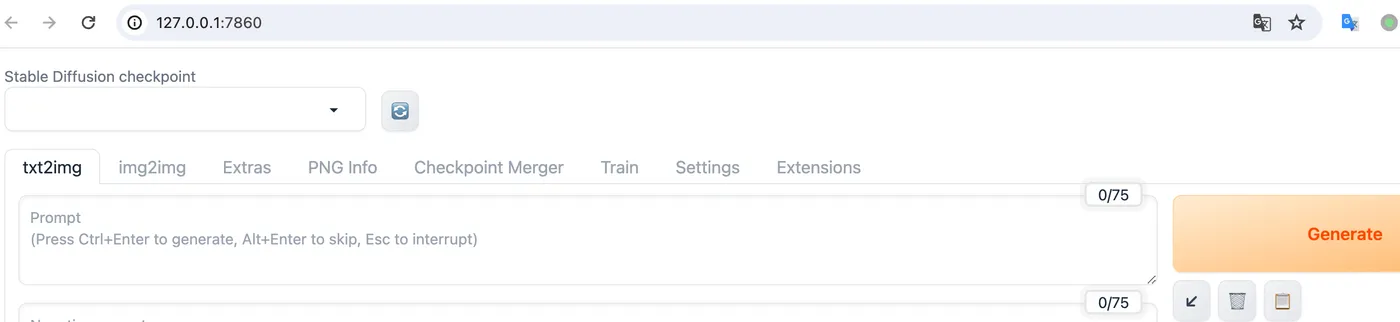
After a long wait, sd-webui has started.
It will automatically open a page.
SDWebUI
|—Link: https://sdwebui.ai/?from=vq
|—Authentic Stable Diffusion WebUI V1.10.1~
|—Top-tier 4090 GPU, premium members get exclusive single 4090 card for image generation~
|—Supports Mac client, Windows client, and Web online usage~
|—Innovative instant model transfer feature, instantly use local models~
|—Supports txt2img, img2img, extras, and PNG info
|—Supports CLIP interrogation and DeepBooru interrogation
|—Supports Hires.fix with 21 built-in upscaling models
|—Supports ADetailer with 11 built-in repair models
|—Supports ControlNet with 44 built-in preprocessors and 68 built-in models
|—Supports super-resolution upscaling (Tiled Diffusion, Demo Fusion, Tiled VAE)
|—Supports old photo restoration with 21 built-in upscaling models, plus GFPGAN and CodeFormer restoration models
|—Built-in 2 common Styles, 11 popular Checkpoint models, 7 popular LoRA models, 14 common embeddings
|—Built-in oldsix prompt plugin
|—Built-in 23-lesson beginner tutorial