
StableDiffusionWebUI: Interface Overview
Preface
The previous chapters covered SD installation. This chapter introduces the sdwebui interface.
Introduction
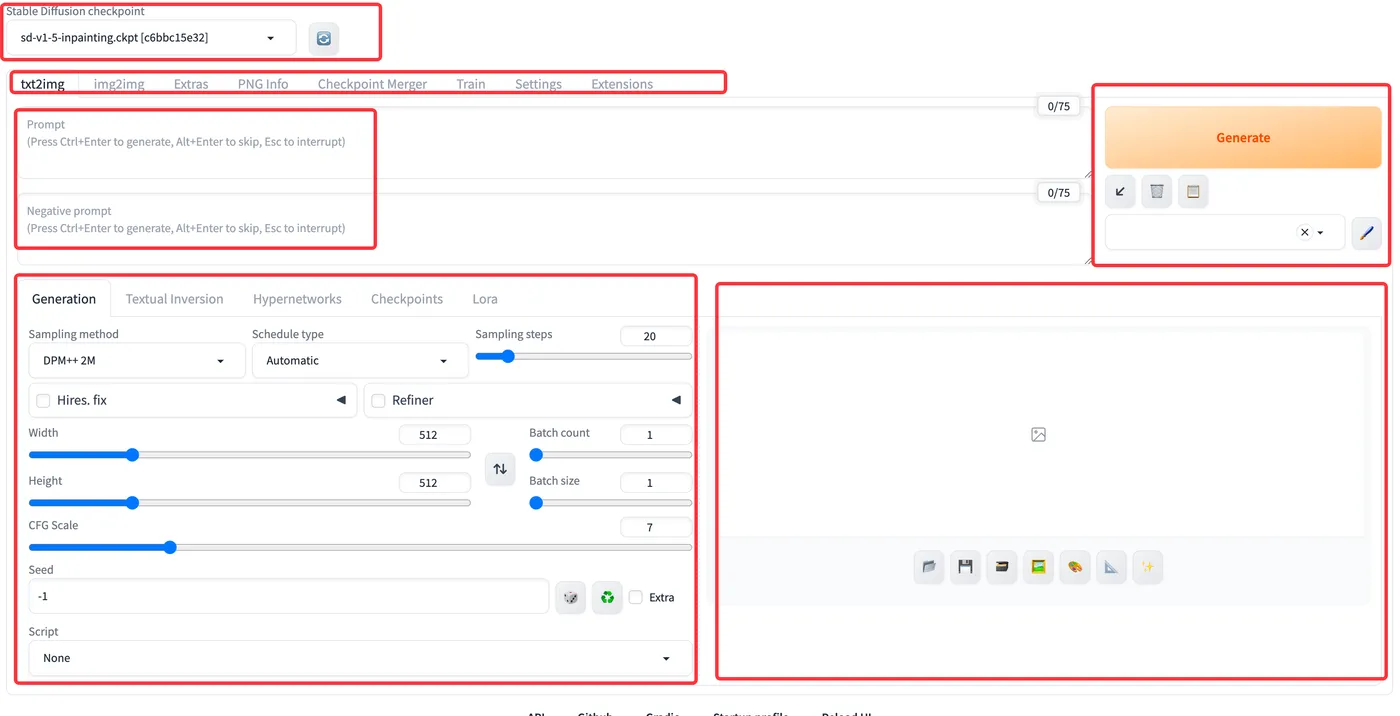
From top to bottom, the interface includes:
Model selection area: Select checkpoint models and refresh after adding models locally
Main function tabs: Switch between common features such as txt2img, img2img, and PNG info
Prompt area: Enter positive and negative prompts
Generation parameters area: Adjust various generation parameters
Image preview area: View and preview generated images
txt2img Tab
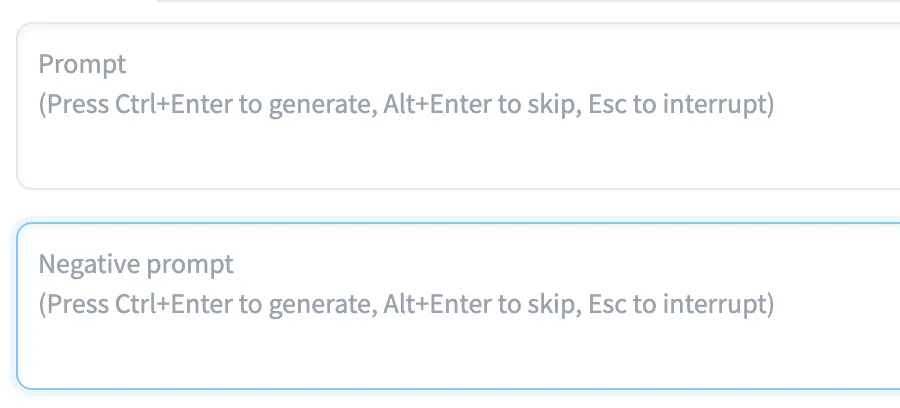
Prompt Area
Positive prompt area: Enter positive prompts
Negative prompt area: Enter negative prompts
Generation Parameters Area
Sampling method: The algorithm that controls the process from a noisy image to a clear image, essentially the denoising process
Schedule type: The scheduler, which controls the degree of denoising. Reference article: https://blog.csdn.net/JuMengXiaoKeTang/article/details/138400543
Sampling steps: The number of iteration steps. Too few or too many steps both produce suboptimal results
Hires. fix: A type of high-resolution enhancement that offers various upscaling algorithms. Reference article: https://blog.csdn.net/x1131230123/article/details/134785633
Refiner: Refinement mode. Reference article: https://juejin.cn/post/7273758446112129078
width: Width
height: Height
batch count: Number of batches
batch size: Number of images per batch
CFG Scale: A parameter that controls the relevance between prompts and generated images. Reference article: https://huke88.com/article/8088.html
seed: Random seed. Reference article: https://huke88.com/article/8093.html
Script: Python scripts that allow custom processing. Reference article: https://www.dongwm.com/post/stable-diffusion-script/
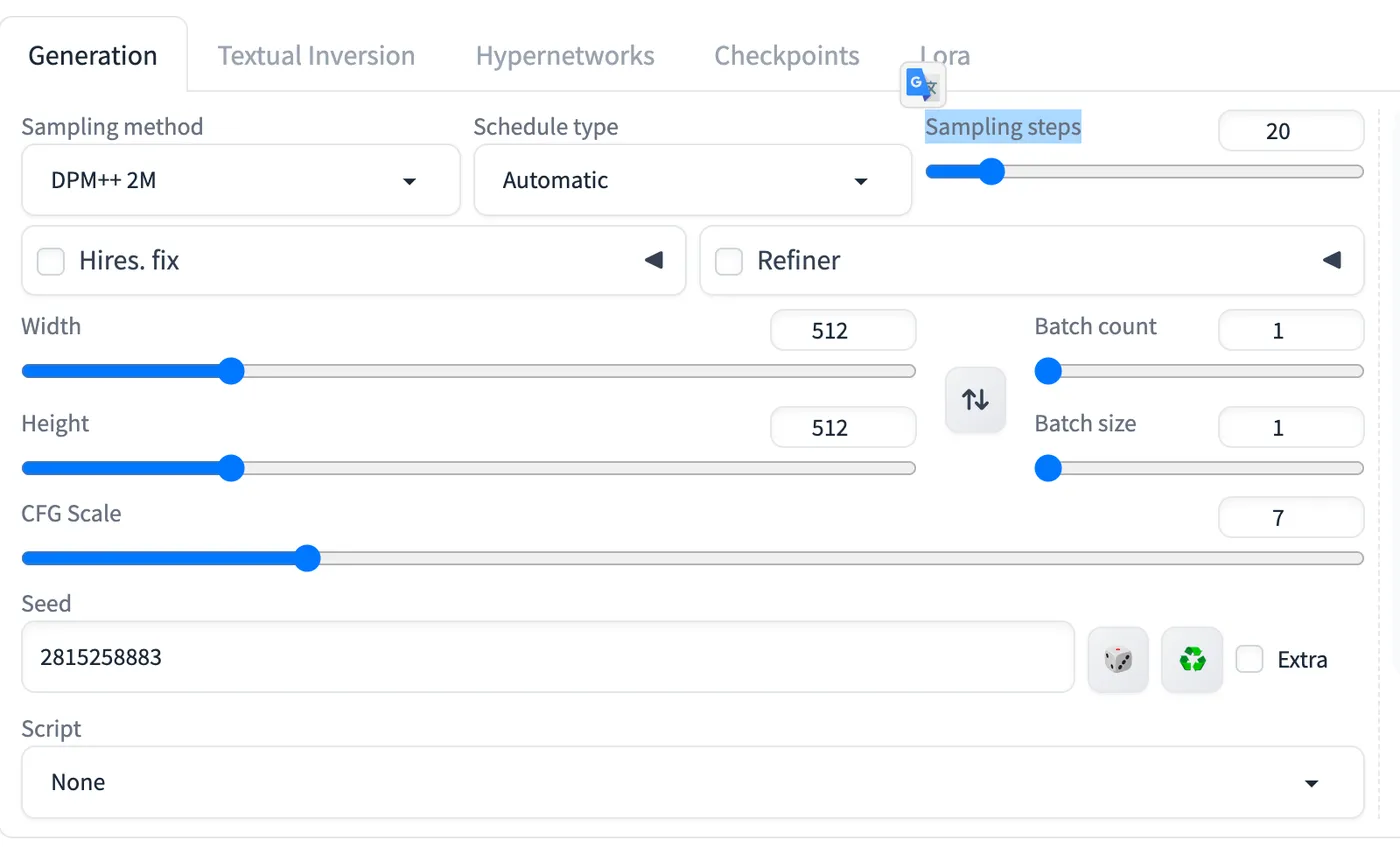
Image Preview Area
The buttons at the bottom of the image preview area, from left to right:
Open the image folder,
Save the image locally,
Zip the image locally,
Send the image to the img2img tab,
Send the image to the inpaint tab,
Send the image to the extras tab,
Upscale the image using hires.fix

SDWebUI
|—Link: https://sdwebui.ai/?from=vq
|—Authentic Stable Diffusion WebUI V1.10.1~
|—Top-tier 4090 GPU, premium members get exclusive single 4090 card for image generation~
|—Supports Mac client, Windows client, and Web online usage~
|—Innovative instant model transfer feature, instantly use local models~
|—Supports txt2img, img2img, extras, and PNG info
|—Supports CLIP interrogation and DeepBooru interrogation
|—Supports Hires.fix with 21 built-in upscaling models
|—Supports ADetailer with 11 built-in repair models
|—Supports ControlNet with 44 built-in preprocessors and 68 built-in models
|—Supports super-resolution upscaling (Tiled Diffusion, Demo Fusion, Tiled VAE)
|—Supports old photo restoration with 21 built-in upscaling models, plus GFPGAN and CodeFormer restoration models
|—Built-in 2 common Styles, 11 popular Checkpoint models, 7 popular LoRA models, 14 common embeddings
|—Built-in oldsix prompt plugin
|—Built-in 23-lesson beginner tutorial