
Node.js Web Server in Practice: Local Logging
Preface
Local logging is an essential capability in server-side development.
In Node.js web server development,
you can use log4js to implement local logging.
qiao-log
You can refer to the official documentation for log4js usage.
Here is a packaged npm module for convenience: https://www.npmjs.com/package/qiao-log
By default, it outputs logs to both the console and local files.
Local log output uses the datefile appender.
The corresponding configuration is as follows:
  {
    appenders: {
      stdout: {
        type: 'stdout',
      },
      datefile: {
        type: 'dateFile',
        pattern: 'yyyy-MM-dd-hh',
        filename: 'log.log',
        keepFileExt: true,
      },
    },
    categories: {
      default: {
        level: 'debug',
        appenders: ['stdout', 'datefile'],
      },
    },
  }
Usage is as follows:
1. Create a logger, where options is optional:
const Logger = require('qiao-log');
const logger = Logger(options);
2. Print logs:
logger.debug;
logger.info;
logger.warn;
logger.error;
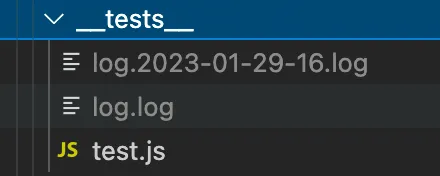
The effect is as follows:
1. Output logs to the console

2. Output logs to the corresponding directory
Using in qiao-z
qiao-z is a minimalist Node.js web server framework.
See: https://qiao-z.vincentqiao.com/#/
You can conveniently use the qiao-log plugin in qiao-z to write local logs.
Pass in the qiao-log plugin and log-options during initialization, as follows:
// options
const options = {
  // log
  log: require('qiao-log'),
  logOptions: require('./server/log-options.js')(),
};

// qz
const qz = require('qiao-z');

// app
const app = qz(options);
Where you need to write local logs, you can use req.logger, as follows:
req.logger.error(error);The content of log-options.js is as follows:
/**
 * log options
 * @returns
 */
module.exports = () => {
  // log options
  const logLevel = 'debug';
  const logPattern = 'yyyy-MM-dd-hh';
  const logPath = require('path').resolve(__dirname, '../logs/qiao-z.log');

  return {
    appenders: {
      stdout: {
        type: 'stdout',
      },
      datefile: {
        type: 'dateFile',
        pattern: logPattern,
        filename: logPath,
        keepFileExt: true,
      },
    },
    categories: {
      default: {
        level: logLevel,
        appenders: ['stdout', 'datefile'],
      },
    },
  };
};
Summary
1. Introduction to log4js, https://www.npmjs.com/package/log4js
2. Introduction to qiao-log, https://code.insistime.com/#/qiao-log
3. Using the qiao-log plugin in qiao-z, https://qiao-z.vincentqiao.com/#/plugins/logger