
Electron in Practice: Update Strategies

Preface
After developing a desktop app with Electron,
the next question is how to update subsequent versions.
This article introduces several update strategies.
Electron Architecture
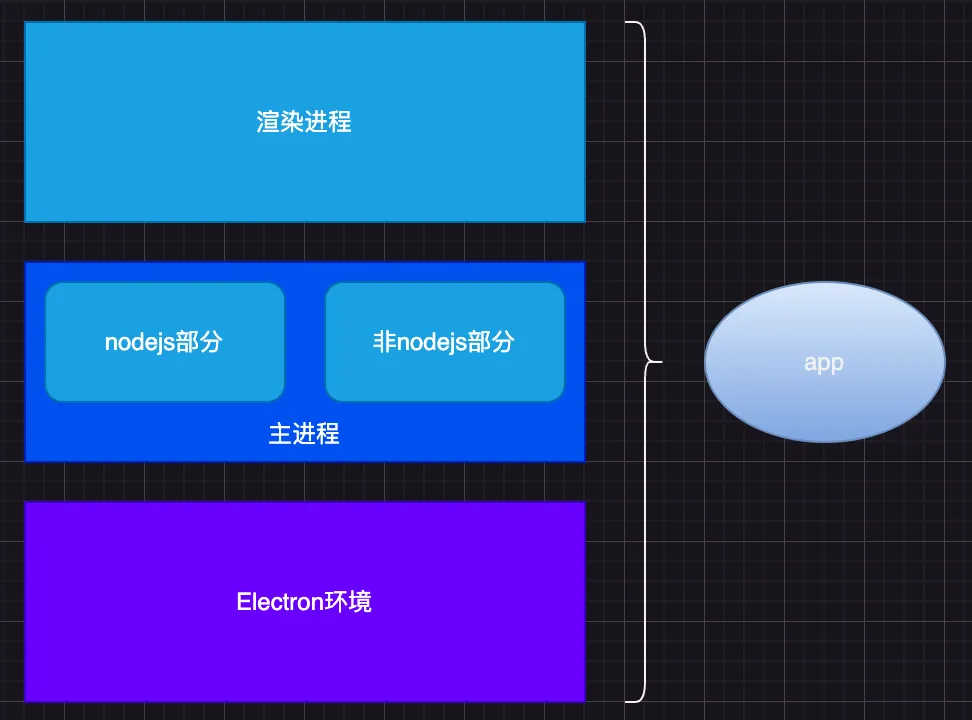
An Electron desktop app
consists of several parts:
1. The Electron runtime itself
2. The main process, which includes a Node.js part and a non-Node.js part (e.g. C++)
3. The renderer process, which can be built with any frontend technology
File Structure
Taking a Mac app as an example, the file structure consists of:
1. The installer DMG — think of it as a compressed version of the app bundle
2. The app bundle (.app)
3. The business code in the resources folder
4. The core business code in the app folder
5. The app folder contains renderer, main, and plugins folders
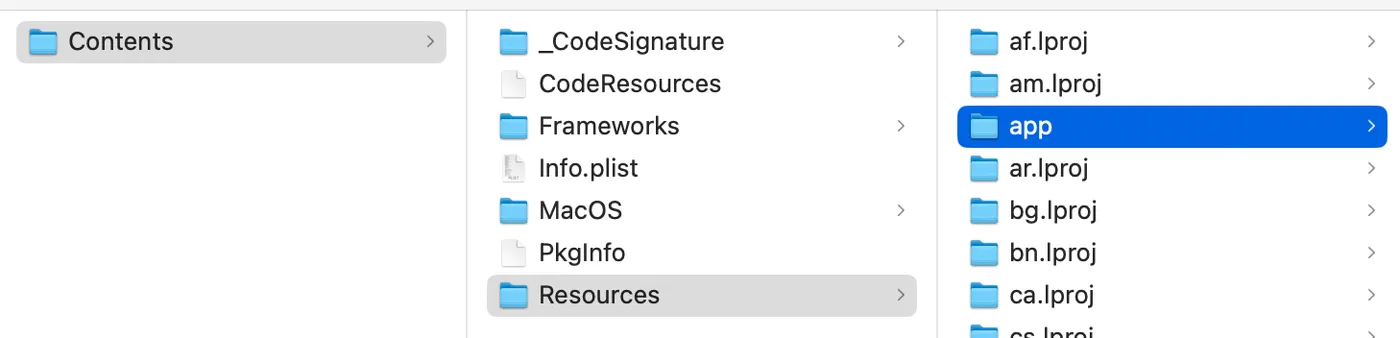
The mapping between architecture and folder structure:

Update Frequency and Strategies
Now that we understand the Electron architecture and the folder structure mapping,
let’s look at the update frequency and recommended strategies for each part:
1. Electron runtime: refers to Electron version changes. After initial development this rarely changes. If it does, a new DMG is needed — full update.
2. Main process — non-Node.js part: refers to C++ components like dylib, node files, etc. Changes are also rare. If needed, a full update is recommended.
3. Main process — Node.js part: business code written in Node.js. Changes are frequent. Incremental updates work well.
4. Renderer process: the frontend part. Changes most frequently. Incremental updates are ideal.

Update Package Size
Using a previous business app as an example,
comparing package sizes for different update strategies:
1. Full update: DMG — 90MB
2. Incremental update: main process Node.js part + renderer process — 3.4MB, which is 3.4% of the full update
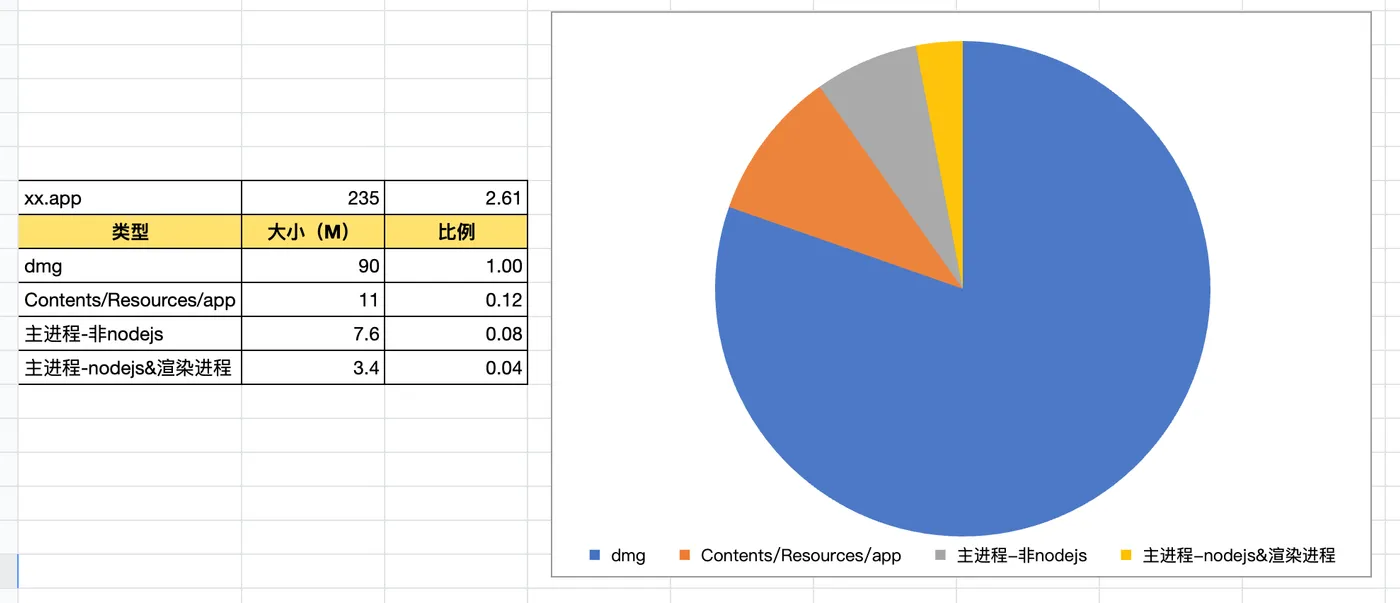
So the parts that change most frequently (main process Node.js + renderer) actually have the smallest update package size.
Packaging Methods
To enable incremental updates, the packaging method needs some adjustments.
Default Packaging
The packaging tool used in this article: https://qiao-electron-cli.vincentqiao.com/#/
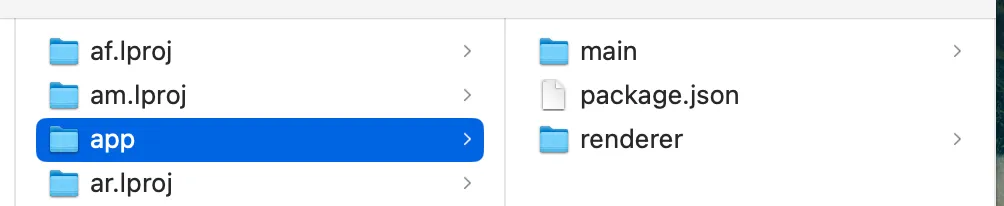
With default packaging, the app folder contains main and renderer folders:
Asar Packaging
Setting the asar option to true in qiao-electron.config.js:
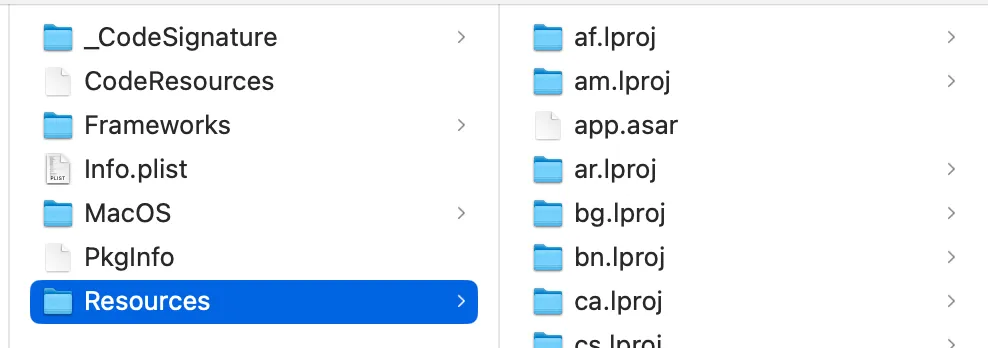
The entire app folder becomes a single asar file.
This isn’t ideal though,
because the non-Node.js main process parts are also bundled in,
and those are large but rarely updated.
Incremental Update Packaging
The ideal result looks like this:
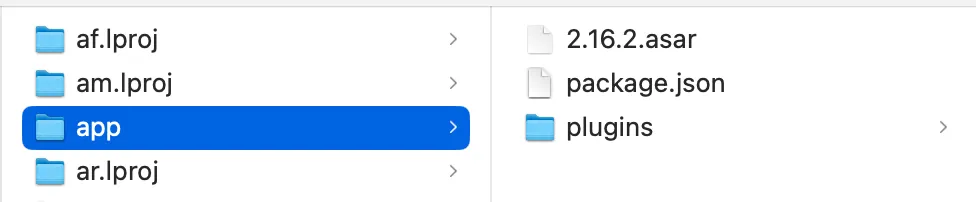
1. Inside the app folder, the non-Node.js main process parts remain as folders (e.g. plugins above)
2. Inside the app folder, the Node.js main process + renderer parts are bundled into a single asar file — keeping the size small and easy to update
Implementation
How do you implement these packaging and update strategies?
Here’s a recommended Electron packaging tool: https://qiao-electron-cli.vincentqiao.com/#/
File Structure
The corresponding file structure:
1. xx-renderer folder: contains renderer process code, builds the final output to xx-electron/dist/renderer
2. xx-main folder: contains main process Node.js code, builds the final output to xx-electron/dist/main
3. xx-electron folder: contains packaging config files
Default Packaging
Create a config file in xx-electron: qiao-electron.config.js
For default packaging config details, see: https://qiao-electron-cli.vincentqiao.com/#/packmac
After running the command, the Mac app bundle is output to xx-electron/out/xx-darwin-arm64:
> icns-electron@0.0.4 packmac:arm64
> qelectron pm ./pack/darwin-arm64.config.js

can not find ./qiao-electron.mac-sign.js
pack electron application by qiao-electron-cli:
{
  arch: 'arm64',
  overwrite: true,
  asar: false,
  dir: 'dist',
  out: 'out',
  platform: 'darwin',
  name: 'icns',
  icon: 'pack/icon/icon.icns',
  appVersion: '0.0.4',
  appCopyright: 'Copyright © 2024 insistime.com版权所有'
}

Packaging app for platform darwin arm64 using electron v30.0.1
pack electron application success!
Final output:
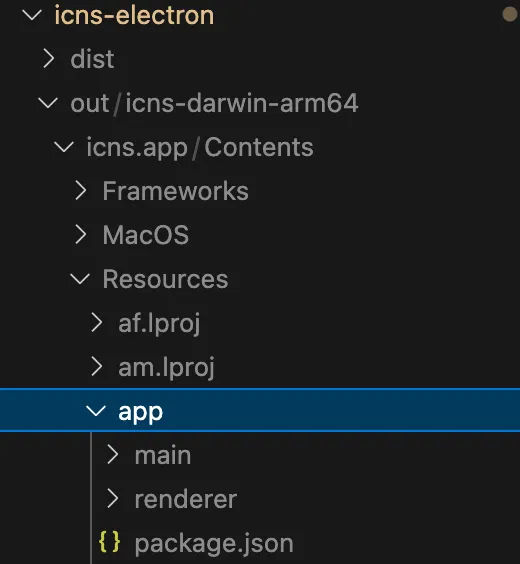
Asar Packaging
The only difference from default packaging is setting asar to true in the config file.
The app folder in the final output becomes an asar file:
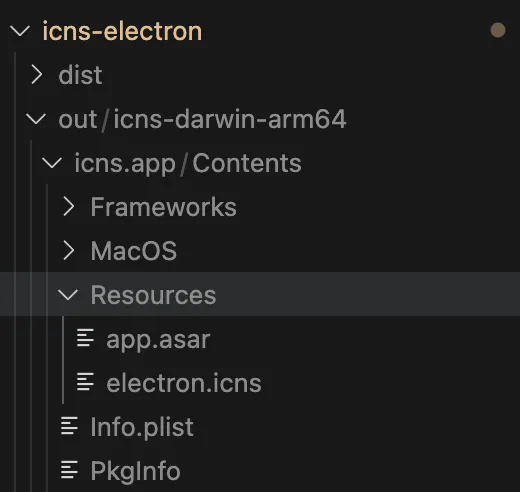
Mac Signing and Notarization
See another article for details: https://blog.insistime.com/electron-mac-sign
For packaging with qiao-electron-cli, see: https://qiao-electron-cli.vincentqiao.com/#/packmac
An additional config file is added under xx-electron: qiao-electron.mac-sign.js
The packaging process now includes signing and notarization, which takes a bit longer.
Console output and final output are similar to the two methods above.
Incremental Update Packaging
Simply set the versionUpdate property to true in qiao-electron.config.js.
Console output:
> icns-electron@0.0.4 packmac:arm64
> qelectron pm ./pack/darwin-arm64.config.js

qiao-electron-cli / error / pack /  can not find ./qiao-electron.mac-sign.js
qiao-electron-cli / info / versionUpdate /  root /Users/vincent/Desktop/insistime/icns-monorepo/packages/icns-electron
qiao-electron-cli / info / versionUpdate /  version 0.0.4
qiao-electron-cli / info / versionUpdate /  postPath dist-post
qiao-electron-cli / info / versionUpdate /  cpSrc /Users/vincent/Desktop/insistime/icns-monorepo/packages/icns-electron/dist
qiao-electron-cli / info / versionUpdate /  cpDest /Users/vincent/Desktop/insistime/icns-monorepo/packages/icns-electron/dist-post/0.0.4
qiao-electron-cli / info / versionUpdate /  cpRes true
qiao-electron-cli / info / versionUpdate /  asarDest /Users/vincent/Desktop/insistime/icns-monorepo/packages/icns-electron/dist-post/0.0.4.asar
qiao-electron-cli / info / versionUpdate /  asarRes sucess
qiao-electron-cli / info / versionUpdate /  jsonSrc /Users/vincent/Desktop/insistime/icns-monorepo/packages/icns-electron/dist-post/0.0.4/package.json
qiao-electron-cli / info / versionUpdate /  jsonDest /Users/vincent/Desktop/insistime/icns-monorepo/packages/icns-electron/dist-post/package.json
qiao-electron-cli / info / versionUpdate /  jsonStr {
  "name": "icns",
  "private": true,
  "version": "0.0.4",
  "main": "main/index.js",
  "dependencies": {}
}

qiao-electron-cli / info / versionUpdate /  jsonRes true
qiao-electron-cli / info / versionUpdate /  rmRes true
qiao-electron-cli / info / versionUpdate /  mvRes true
qiao-electron-cli / info / pack.js /  pack electron application by qiao-electron-cli:
qiao-electron-cli / info / pack.js /  config {
  arch: 'arm64',
  overwrite: true,
  asar: false,
  versionUpdate: true,
  dir: 'dist',
  out: 'out',
  platform: 'darwin',
  name: 'icns',
  icon: 'pack/icon/icon.icns',
  appVersion: '0.0.4',
  appCopyright: 'Copyright © 2024 insistime.com版权所有',
  afterInitialize: [ [AsyncFunction (anonymous)] ]
}

Packaging app for platform darwin arm64 using electron v30.0.1
qiao-electron-cli / info / afterPack /  buildPath /var/folders/t7/pcqmy6kj07b97z_2h5g5_sjr0000gn/T/electron-packager/darwin-arm64/icns-darwin-arm64-Sy6Xw1/Electron.app/Contents/Resources/app
qiao-electron-cli / info / afterPack /  jsonSrc /var/folders/t7/pcqmy6kj07b97z_2h5g5_sjr0000gn/T/electron-packager/darwin-arm64/icns-darwin-arm64-Sy6Xw1/Electron.app/Contents/Resources/app/package.json
qiao-electron-cli / info / afterPack /  jsonStr {"name":"icns","private":true,"version":"0.0.4","main":"0.0.4/main/index.js","dependencies":{}}
qiao-electron-cli / info / afterPack /  jsonVersion 0.0.4
qiao-electron-cli / info / afterPack /  jsonAfterStr {"name":"icns","private":true,"version":"0.0.4","main":"0.0.4.asar/main/index.js","dependencies":{}}
qiao-electron-cli / info / afterPack /  jsonRes true
qiao-electron-cli / info / afterPack /  rmPath /var/folders/t7/pcqmy6kj07b97z_2h5g5_sjr0000gn/T/electron-packager/darwin-arm64/icns-darwin-arm64-Sy6Xw1/Electron.app/Contents/Resources/app/0.0.4
qiao-electron-cli / info / afterPack /  rmRes true
qiao-electron-cli / info / pack /  pack electron application success!
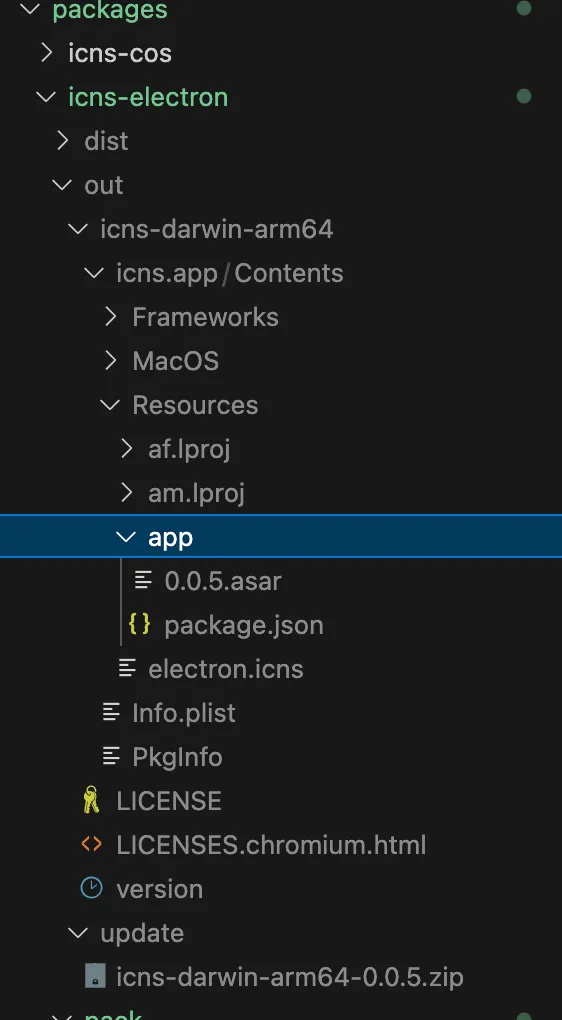
Final output:
1. The app folder contains an asar file and a package.json file
2. out/update contains a zip of the asar file, ready for subsequent updates
Incremental Update
After building the incremental update package as described above, how do you implement the actual update?
An npm package has been created for this: https://code.insistime.com/#/qiao-x-update
Usage is straightforward:
updateApp(downloadUrl, appPath, appVersion);Summary
1. Introduced the Electron app architecture and corresponding file structure
2. Discussed update frequency and package sizes for each part
3. Recommended a fine-grained packaging approach
4. Introduced incremental update packaging with qiao-electron-cli: https://qiao-electron-cli.vincentqiao.com/#/
5. Introduced the incremental update implementation package: https://code.insistime.com/#/qiao-x-update