Electron in Practice: Local Logging

Preface
After developing a local app with Electron,
local logging is essential.
It helps capture user actions and locate bugs.
Local logs differ from real-time analytics —
they are larger, more detailed, and not all information is suitable for reporting.
Similarities and Differences with Node.js Logging
Writing local logs in Electron is similar to Node.js.
If you want to build your own, refer to this article: Node.js WebServer in Practice: Local Logging
The differences are:
1. The timing of logger initialization
2. Renderer process logs are sent to the main process via IPC and then written locally
qiao-x-logger
An npm package has been created for this — feel free to use it: https://code.insistime.com/#/qiao-x-logger
Initialization
It is recommended to initialize as early as possible so that more log information can be captured.
For example, initialize on the first line of the Electron entry JS file:
// init
import { initLogger } from 'qiao-x-logger';

// init logger
const loggerPath = path.resolve(app.getPath('logs'), './electron.log');
initLogger(loggerPath);
Main Process Usage
Using it in the main process is straightforward:
// logger
import { Logger } from 'qiao-x-logger';
const logger = Logger('sips.js');

logger.info('iconutil', 'success');
Renderer Process Usage
In the renderer process, logs need to be sent to the main process via IPC before being written locally.
1. Initialize the main process IPC listener
// log ipc
import { logIPCInit } from 'qiao-x-logger';

logIPCInit();
2. Preload setup
log-preload.js
// electron
import { ipcRenderer } from 'electron';

/**
 * logIPC
 * @param {*} msg
 * @param {*} type debug,info,warn,error
 */
export const logIPC = (msg, type) => {
  ipcRenderer.send('ipc-log', { msg, type });
};
preload.js
// electron
import { contextBridge } from 'electron';

// custom preload
import { logIPC } from './log-preload.js';

// preload
contextBridge.exposeInMainWorld('electron', {
  logIPC,
});
3. Renderer process usage
window.electron.logIPC(`selectPngPath filePath ${filePath}`, 'info');Result
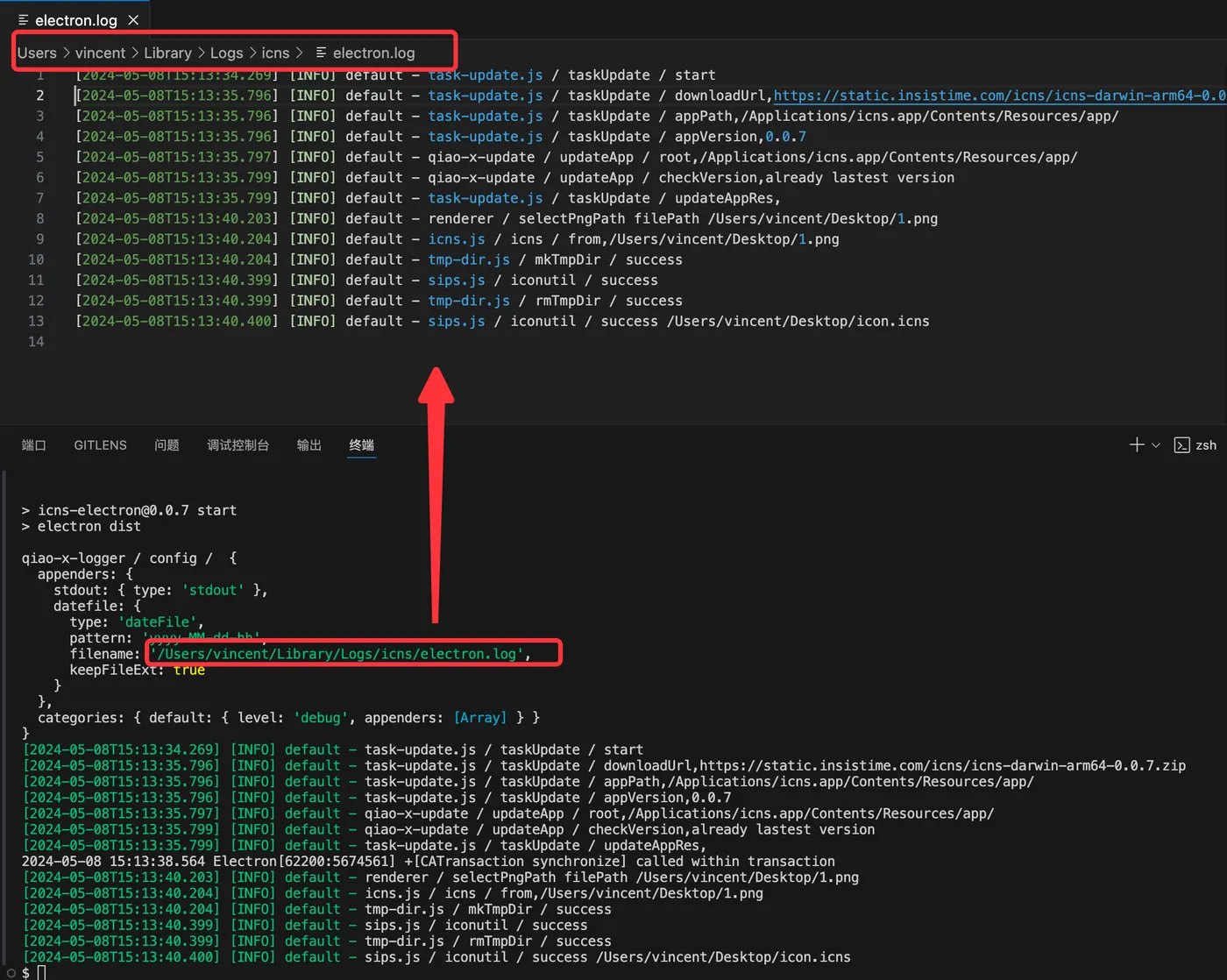
After writing logs, a log file will be generated at the logPath, split by hour.
The output looks like this: