
Claude Code MCP: Give Your AI Access to Any Tool

Table of Contents
- What is /mcp
- Understanding MCP First
- How to Use It
- View Configured MCP Servers
- Add an MCP Server (CLI)
- Add with JSON (More Flexible)
- Remove an MCP Server
- List All Servers
- Configuration Scope
- Project-Level Config (Recommended for Teams)
- User-Level Config (Personal Use)
- Useful MCP Servers
- Real-World Use Cases
- Use Case 1: Connect a Database for Data Analysis
- Use Case 2: Let Claude Code Manage GitHub
- Use Case 3: Connect a Knowledge Base
- Practical Tips
- Tip 1: Commit Project Config to Git
- Tip 2: Use Environment Variables for Secrets
- Tip 3: Add Only What You Need
- Tip 4: Use /mcp to Troubleshoot
- What .mcp.json Looks Like
- /mcp + CLI vs Manual Config
- Final Thoughts

What is /mcp
When using Claude Code, you might run into situations like these:
- You want Claude Code to query your database directly, but it can’t access it
- You want it to manage GitHub issues, but it’s limited to the
ghCLI - You want it to read docs from Confluence or Notion, but it can’t reach them
Claude Code has natural boundaries — it can read and write local files and run shell commands, but when it comes to external services and data sources, it’s out of reach.
That’s exactly what the /mcp command is for.
/mcp is a slash command in Claude Code for managing MCP (Model Context Protocol) servers. MCP servers act like “plugins” that let Claude Code connect to external tools and data sources, gaining capabilities it doesn’t have natively.
Understanding MCP First
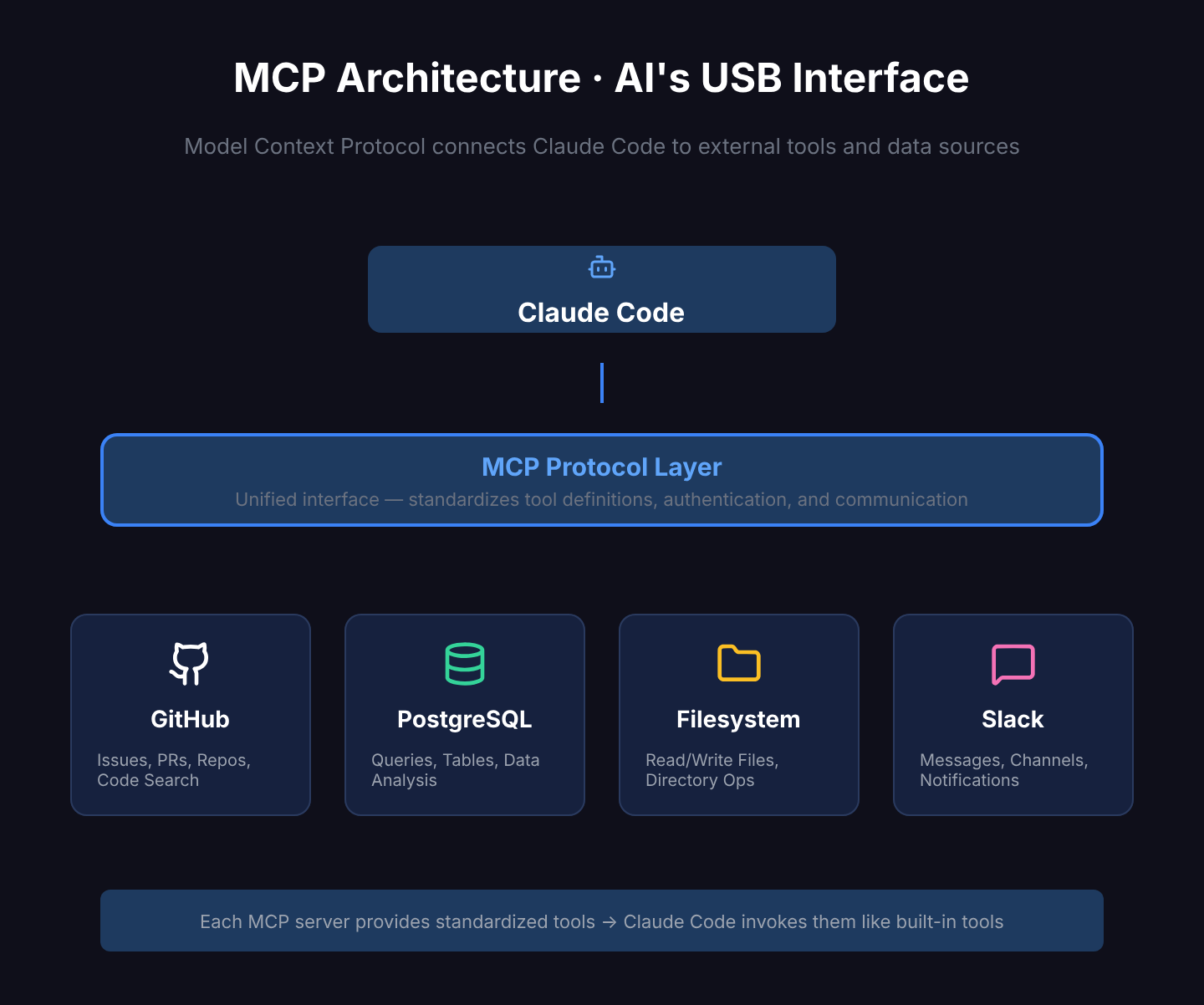
MCP stands for Model Context Protocol, an open standard created by Anthropic.
Think of it as a USB port for AI — a universal protocol that lets AI models connect to all kinds of external tools and data sources. With MCP, Claude Code is no longer limited to local files and shell commands — it can talk to databases, APIs, cloud services, and more.
An MCP server is essentially a small program that:
- Implements the MCP protocol
- Provides a set of specific tools (e.g., “query database”, “create GitHub issue”)
- Claude Code calls these tools through the protocol, just like its built-in tools
How to Use It
View Configured MCP Servers
In Claude Code’s interactive mode, type:
/mcpThis lists all currently configured MCP servers and their status.
Add an MCP Server (CLI)
Use the claude mcp add command in your terminal:
claude mcp add <name> <command> [args...]For example, adding a filesystem MCP server:
claude mcp add filesystem npx -y @modelcontextprotocol/server-filesystem /path/to/dirAdd with JSON (More Flexible)
For complex configurations like environment variables, use add-json:
claude mcp add-json github-server '{
  "command": "npx",
  "args": ["-y", "@modelcontextprotocol/server-github"],
  "env": {
    "GITHUB_TOKEN": "your-token-here"
  }
}'
Remove an MCP Server
claude mcp remove <name>List All Servers
claude mcp listConfiguration Scope
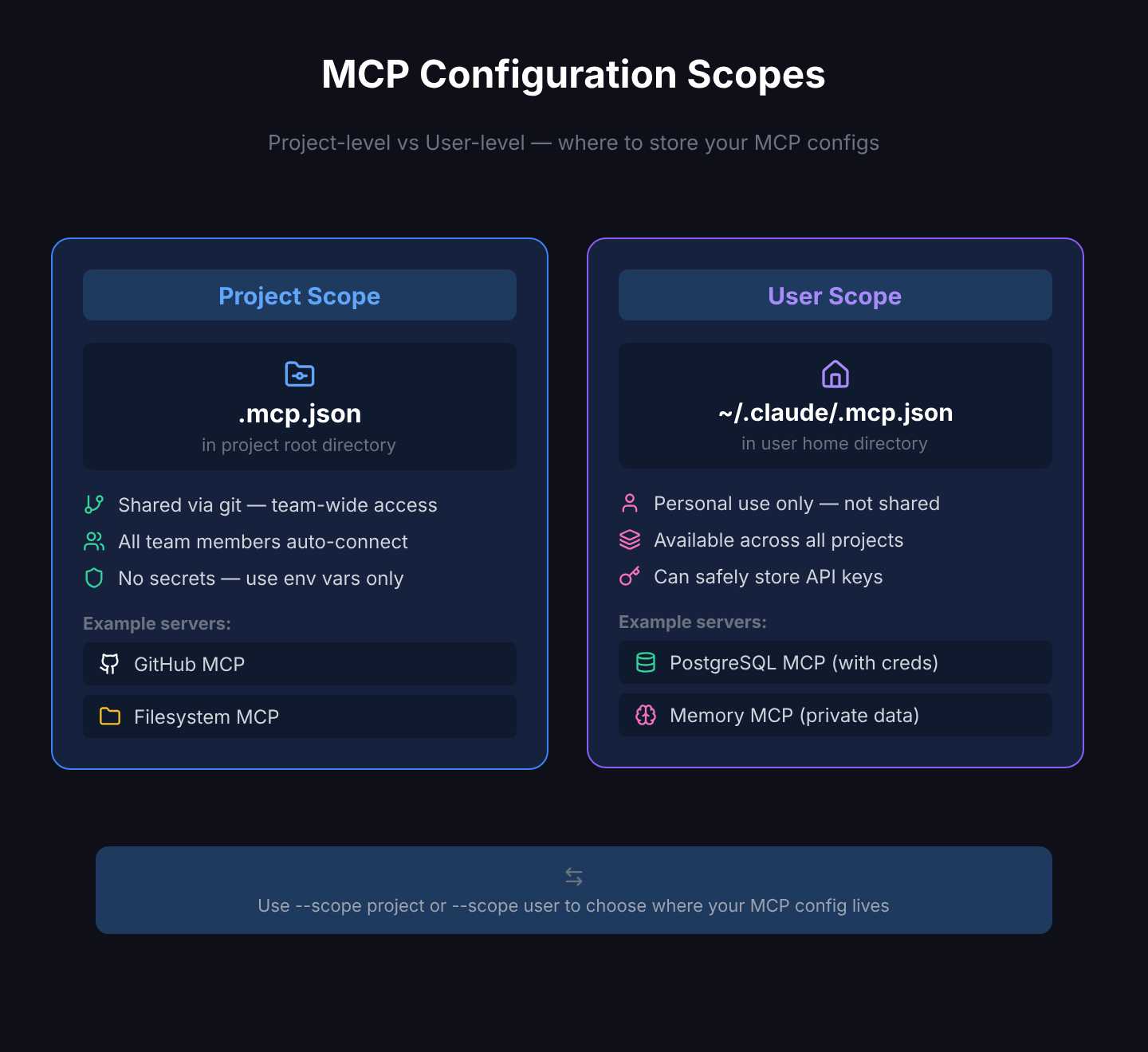
MCP server configurations can live in different locations, each with a different scope:
| Scope | Storage Location | Affects | Flag |
|---|---|---|---|
| project | .mcp.json in project root | Current project only, can be committed to git | --scope project |
| user | ~/.claude/.mcp.json | All projects | --scope user |
Project-Level Config (Recommended for Teams)
claude mcp add filesystem npx -y @modelcontextprotocol/server-filesystem ./data --scope projectThis writes to .mcp.json in the project root. Commit it to git and every team member gets the same MCP servers automatically.
User-Level Config (Personal Use)
claude mcp add my-db npx -y @modelcontextprotocol/server-postgres postgres://localhost/mydb --scope userThis writes to ~/.claude/.mcp.json, applies only to you, and works across all projects.
Useful MCP Servers
The MCP ecosystem is growing rapidly. Here are some popular ones:
| MCP Server | Purpose | Package |
|---|---|---|
| Filesystem | Controlled file read/write | @modelcontextprotocol/server-filesystem |
| GitHub | Manage repos, issues, PRs | @modelcontextprotocol/server-github |
| PostgreSQL | Query PostgreSQL databases | @modelcontextprotocol/server-postgres |
| SQLite | Query SQLite databases | @modelcontextprotocol/server-sqlite |
| Brave Search | Web search | @modelcontextprotocol/server-brave-search |
| Puppeteer | Browser automation | @modelcontextprotocol/server-puppeteer |
| Memory | Knowledge graph-based persistent memory | @modelcontextprotocol/server-memory |
| Slack | Read and send Slack messages | @modelcontextprotocol/server-slack |
For more, search awesome-mcp-servers on GitHub — the community maintains several curated lists.
Real-World Use Cases
Use Case 1: Connect a Database for Data Analysis
After adding a PostgreSQL MCP server, you can simply tell Claude Code:
Show me the number of users who registered in the past 7 days, grouped by dayClaude Code queries the database directly through the MCP server and returns the results. No need to write SQL yourself or copy-paste query results back and forth.
Use Case 2: Let Claude Code Manage GitHub
With the GitHub MCP server added, Claude Code gains more capabilities:
- Create and close issues
- View PR details and comments
- Search code across repositories
- Read files from other repos
Use Case 3: Connect a Knowledge Base
If your team docs live in Notion or Confluence, the corresponding MCP server lets Claude Code read them directly — no more manual copy-pasting.
Practical Tips
Tip 1: Commit Project Config to Git
Commit .mcp.json to your repo so team members get it on clone. But be careful — never put API keys or passwords in .mcp.json. Pass sensitive information through environment variables, or keep them in user-level config.
Tip 2: Use Environment Variables for Secrets
claude mcp add-json my-api '{
  "command": "npx",
  "args": ["-y", "some-mcp-server"],
  "env": {
    "API_KEY": "${MY_API_KEY}"
  }
}'
Keep actual secrets in .env or your shell profile. Reference only variable names in .mcp.json.
Tip 3: Add Only What You Need
Each MCP server takes up Claude Code’s context window (because it needs to describe available tools). Too many unused servers waste tokens. Only add what your current project actually needs.
Tip 4: Use /mcp to Troubleshoot
If an MCP server isn’t working, type /mcp in interactive mode to check its status. It shows whether each server is connected and what tools it provides. Failed connections will display clear error messages.
What .mcp.json Looks Like
A typical project-level .mcp.json file:
{
  "mcpServers": {
    "filesystem": {
      "command": "npx",
      "args": ["-y", "@modelcontextprotocol/server-filesystem", "./docs"]
    },
    "database": {
      "command": "npx",
      "args": ["-y", "@modelcontextprotocol/server-postgres"],
      "env": {
        "DATABASE_URL": "${DATABASE_URL}"
      }
    }
  }
}
The structure is straightforward: under the mcpServers object, each key is a server name and each value is its launch config — command, arguments, and environment variables.
/mcp + CLI vs Manual Config
| /mcp + CLI Commands | Manually Edit .mcp.json | |
|---|---|---|
| Ease of use | CLI interaction, less error-prone | Hand-write JSON, possible format errors |
| Speed | One command and done | Find file, edit, save |
| Flexibility | Covers common scenarios | Full control over config |
| Best for | Day-to-day add/remove | Bulk config, complex setups |
Both approaches write to the same config file, so pick whichever suits the situation. CLI commands for daily use, direct file editing for bulk or fine-tuned configuration.
Final Thoughts
/mcp is one of the most extensible commands in Claude Code. The problem it solves is fundamental: it lets Claude Code reach beyond local files and terminal commands to connect with your entire development ecosystem.
Databases, GitHub, documentation systems, cloud services — as long as there’s a matching MCP server, Claude Code can interact with it directly. This upgrades an AI coding assistant from “can only see code” to “can touch every part of your workflow.”
Next time you catch yourself thinking “if only Claude Code could query my database directly,” remember MCP — there’s probably a server for that already.
Related Articles
Claude Code Agent Loop: Dissecting the Heart of an AI Coding Assistant
How does Claude Code understand your requests, invoke tools, and self-recover step by step? A source-code deep dive into the Agent Loop's core architecture — streaming responses, parallel tool execution, auto-compaction, and error recovery.
Where Is Claude Code settings.json? 5 Config Files, 1 Priority Rule
Claude Code has 5 config file locations: user-level (~/.claude/), project-level (.claude/), local-only, CLI flags, and enterprise managed settings. Learn which file to use when, how priority works, and why your settings might be ignored.
Claude Code settings.json Permissions: Control Exactly What AI Can Do
Stop clicking 'Allow' on every action. Configure Claude Code's permissions system — set allow/deny/ask rules, use wildcards, control MCP tools, and protect sensitive directories. Every permission option with practical examples.
Claude Code settings.json Hooks: Auto-Run Scripts at Every Step
Want to auto-validate commands before they run? Send Slack notifications when tasks finish? Claude Code hooks let you inject custom scripts at key moments — PreToolUse, PostToolUse, Stop, Notification — with practical examples.
Claude Code settings.json: Copy-Paste Templates for env, model, auth & More
Ready-to-use Claude Code settings.json snippets for env vars, model switching, apiKeyHelper auth, git signing, effort level, language, auto-updates, and more. Every field includes a working JSON example you can copy and paste.