
Claude Code Agent Loop: Dissecting the Heart of an AI Coding Assistant

Table of Contents
- What Is the Agent Loop
- The Core Loop: A while(true)
- Streaming Responses: Tools Start Before the Model Finishes Talking
- Parallel Tool Execution: Not All Tools Can Run in Parallel
- Tool Lifecycle: Three Checkpoints
- Five Layers of Compression: Context Never Overflows
- Layer 1: Tool Result Budget
- Layer 2: History Snip
- Layer 3: Microcompact
- Layer 4: Context Collapse (Experimental)
- Layer 5: Autocompact
- Seven Recovery Paths: Do Everything Possible to Avoid Interruption
- 1. Prompt-Too-Long (413 Error)
- 2. Reactive Compact
- 3. Max Output Tokens Escalation
- 4. Max Output Tokens Recovery
- 5. Stop Hook Blocking
- 6. Token Budget Continuation
- 7. Normal Next Turn
- Model Fallback: No Downtime During Traffic Spikes
- Tool Summaries: Haiku Plays Support
- Error Withholding: Handle It Internally, Tell the User Only If You Can’t
- The Big Picture
- Why This Design Is Worth Studying
- Final Thoughts

What Is the Agent Loop
You type a sentence in your terminal, and Claude Code gets to work — reading files, editing code, running tests, fixing bugs, looping over and over until the task is done.
That “looping over and over” thing is the Agent Loop.
It is the heart of Claude Code. Without it, Claude is just a chatbot; with it, Claude becomes an autonomous programming agent capable of completing complex tasks.
In one sentence, here is what the Agent Loop does:
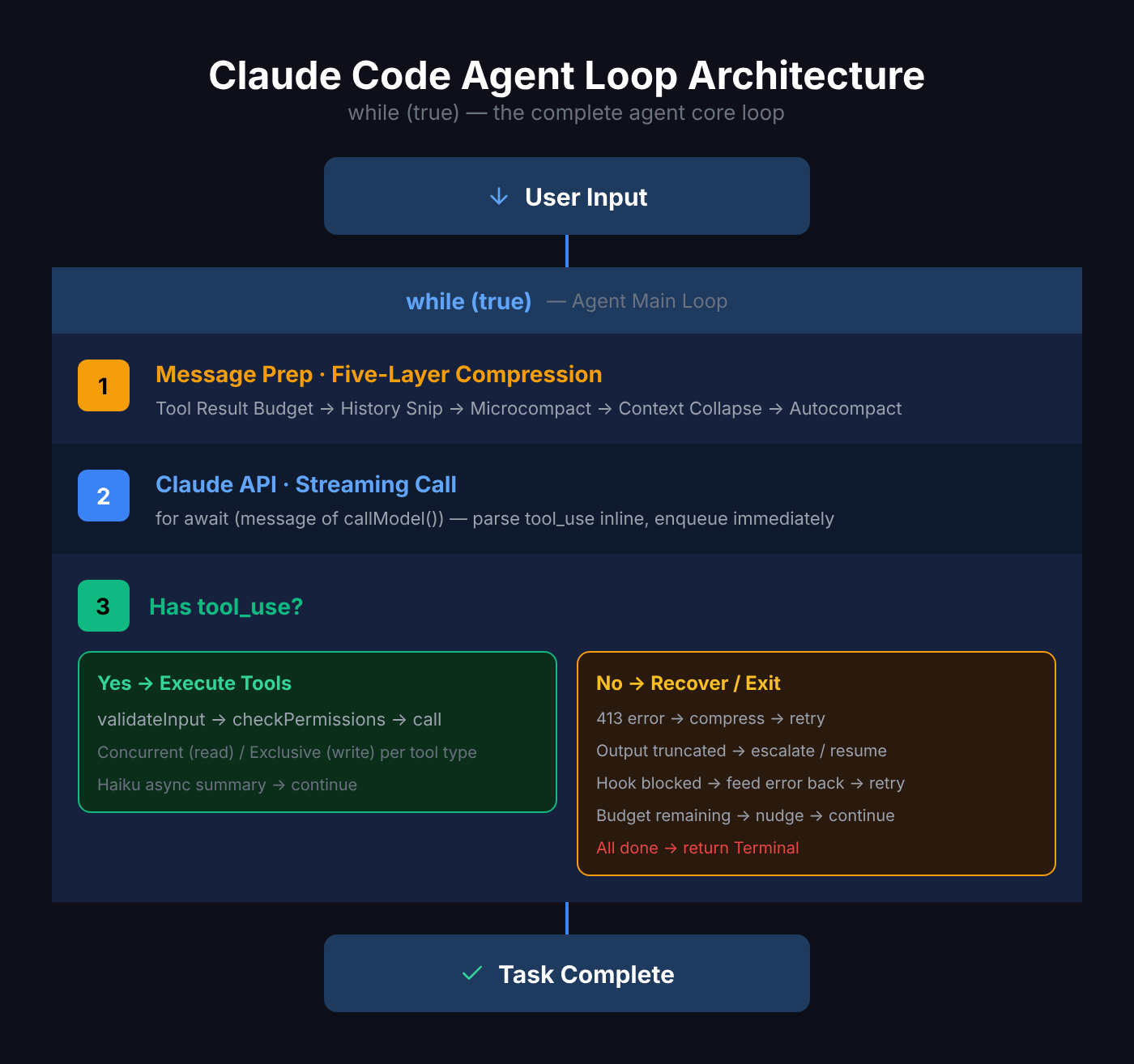
User input → call API → model responds → if tool use is needed, execute tools → feed results back → call API again → repeat until no more tools are needed.
Sounds simple, but the devil is in the details.
The Core Loop: A while(true)
Claude Code’s Agent Loop is essentially an AsyncGenerator function:
export async function* query(
  params: QueryParams,
): AsyncGenerator<StreamEvent | Message, Terminal>
It uses a Generator instead of a regular function because it needs to continuously yield intermediate results (streaming messages, tool progress, status updates) while maintaining loop state.
The core structure looks like this:
while (true) {
  1. Prepare messages (compress, trim, collapse)
  2. Call Claude API (streaming)
  3. Collect model response
  4. Has tool_use? → Execute tools → Collect results → continue
  5. No tool_use? → Check if recovery needed → Otherwise exit
  6. Assemble [original messages + assistant response + tool results]
  7. Enter next iteration
}
The entire loop has 7 continue exit points — each corresponding to a different “can’t stop yet, keep going” scenario.
Streaming Responses: Tools Start Before the Model Finishes Talking
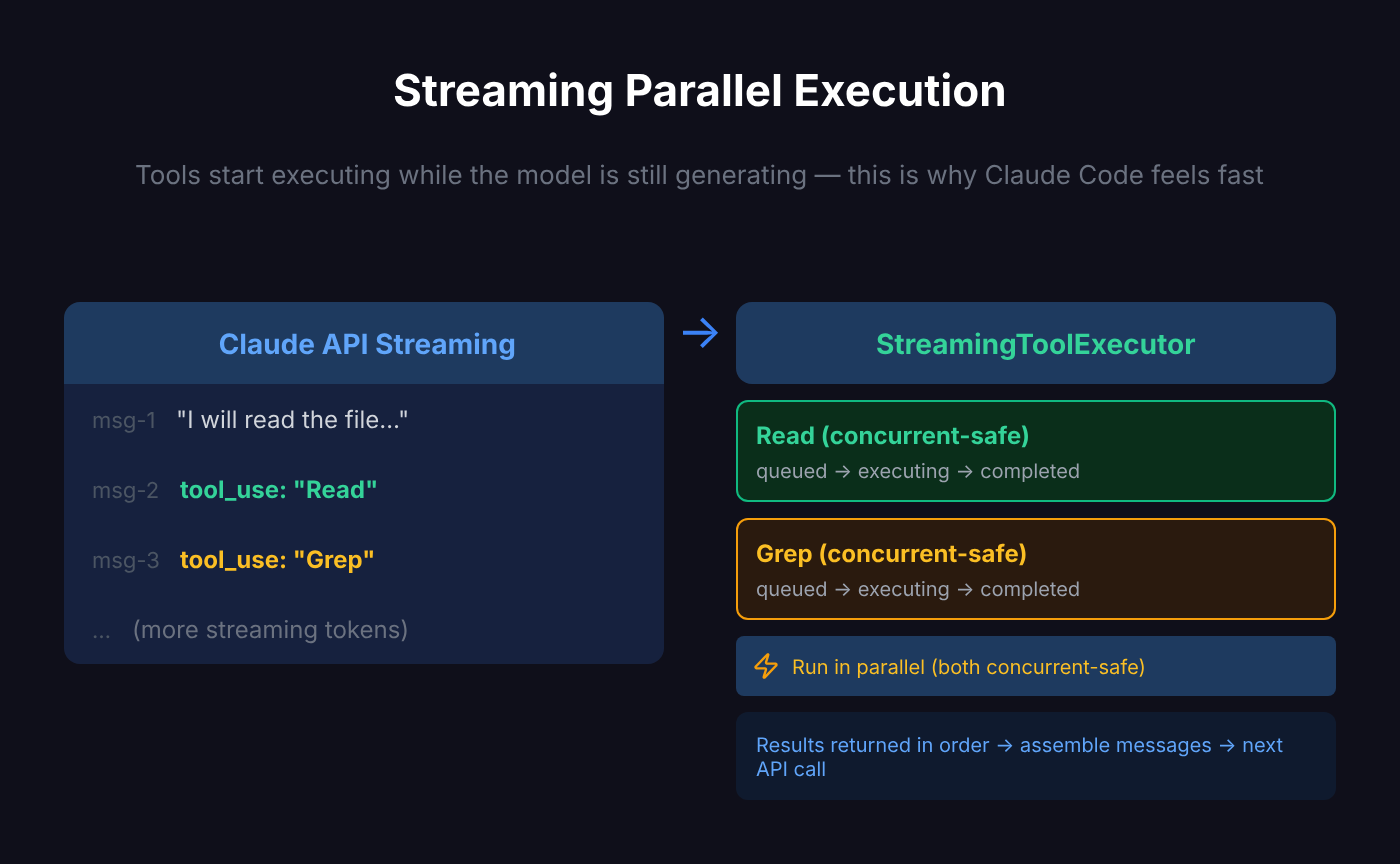
Claude Code doesn’t wait for the model to finish before executing tools — it executes tools while still streaming the response.
When a tool_use type appears in the model’s content blocks, the StreamingToolExecutor immediately queues it for execution:
if (message.type === "assistant") {
  const msgToolUseBlocks = message.message.content.filter((content) => content.type === "tool_use");

  if (msgToolUseBlocks.length > 0) {
    toolUseBlocks.push(...msgToolUseBlocks);
    needsFollowUp = true;
  }

  // Model is still outputting, but tools are already running
  if (streamingToolExecutor) {
    for (const toolBlock of msgToolUseBlocks) {
      streamingToolExecutor.addTool(toolBlock, message);
    }
  }
}
This means: when Claude calls 3 tools in a single response (say, reading 3 files simultaneously), the first file starts reading before the model even finishes its response.
This is why Claude Code feels faster than you’d expect.
Parallel Tool Execution: Not All Tools Can Run in Parallel
The StreamingToolExecutor manages concurrent tool execution, but it’s not mindless parallelism — it distinguishes between two types of tools:
- Concurrent-safe: Can run in parallel with other concurrent-safe tools (e.g., reading multiple files simultaneously)
- Exclusive: Must execute alone (e.g., writing files, running Bash commands)
private canExecuteTool(isConcurrencySafe: boolean): boolean {
  const executingTools = this.tools.filter(t => t.status === 'executing')
  return (
    executingTools.length === 0 ||
    (isConcurrencySafe && executingTools.every(t => t.isConcurrencySafe))
  )
}
Each tool is tracked as a state machine:
queued → executing → completed → yieldedResults are returned in insertion order (not completion order), ensuring deterministic message flow.
Tool Lifecycle: Three Checkpoints
Claude Code has 40+ built-in tools (Bash, Read, Edit, Grep, Glob, Agent, etc.), each following a unified lifecycle:
validateInput() → checkPermissions() → call()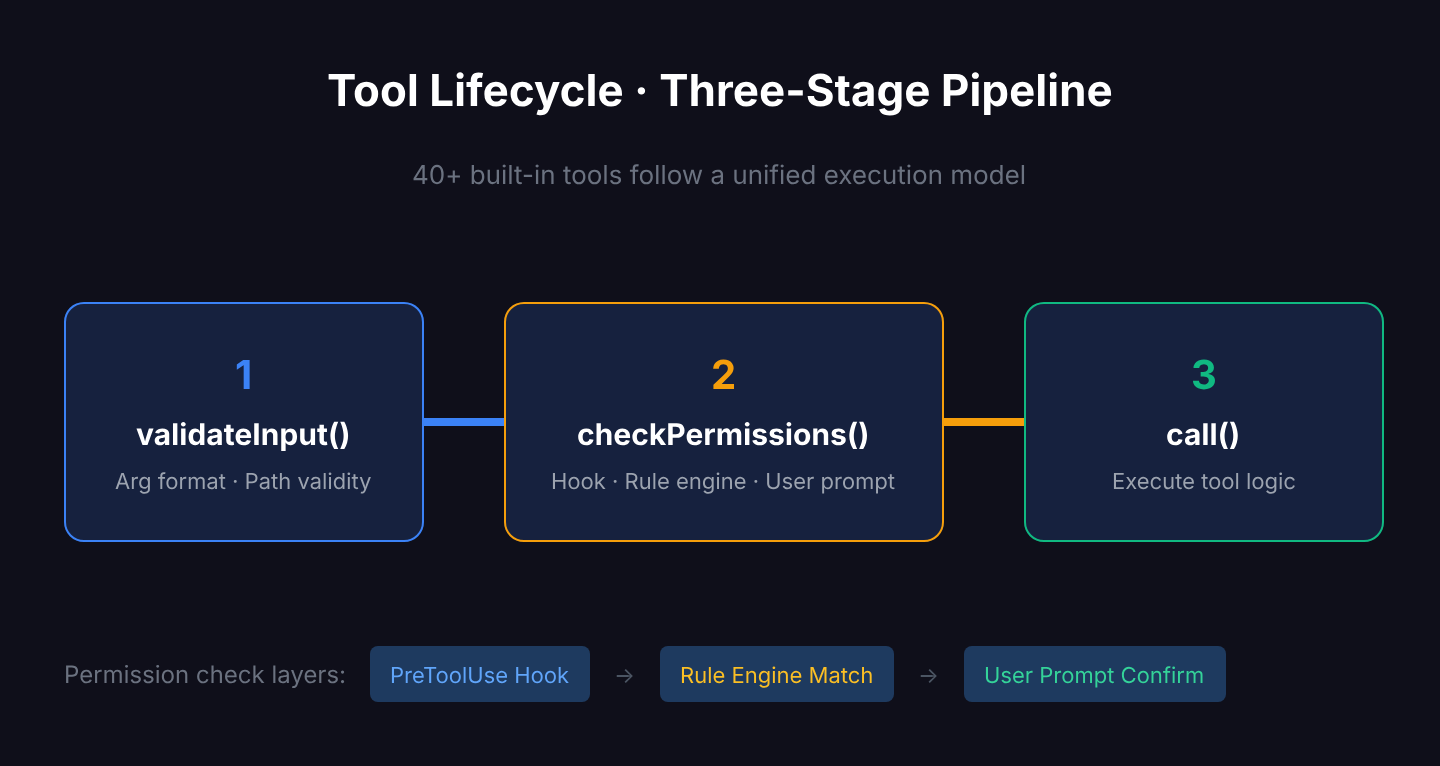
Checkpoint 1: Input validation. Are the argument formats correct? Is the path valid? Invalid inputs are rejected immediately — no time wasted.
Checkpoint 2: Permission check. Is this operation allowed? The permission system has three layers:
- Hook pre-check (user-configured PreToolUse hooks)
- Rule engine matching (allow/deny rules in settings.json)
- User interactive confirmation (a prompt asking you Yes/No)
Checkpoint 3: Execution. Only after passing the first two checkpoints does the tool actually run.
This design ensures safety — Claude never acts first and asks later.
Five Layers of Compression: Context Never Overflows
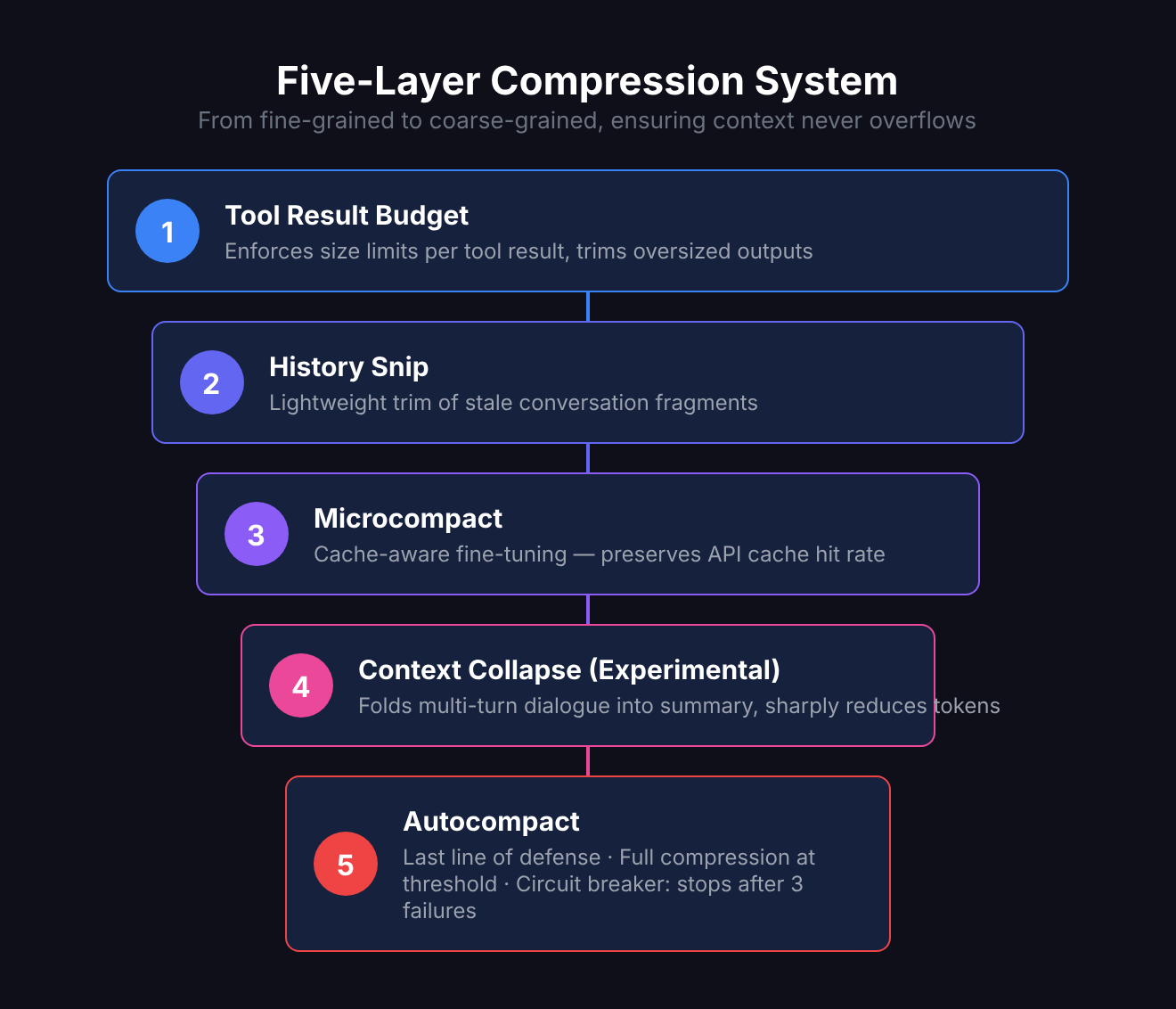
The biggest enemy of long conversations is the context window limit. Claude Code addresses this with a five-layer progressive compression system:
Layer 1: Tool Result Budget
Each tool result has a size cap. If you cat a 100,000-line file, it won’t stuff all 100,000 lines into context — it trims to a reasonable size.
Layer 2: History Snip
Lightweight trimming of historical messages, removing old conversation fragments that are no longer important.
Layer 3: Microcompact
Cache-aware optimization — fine-tuned message compression without breaking API cache hit rates.
Layer 4: Context Collapse (Experimental)
“Folds” multi-turn conversations into summaries, preserving key information while drastically reducing token count. This is an experimental feature controlled by a feature flag.
Layer 5: Autocompact
The last line of defense. When token count approaches the threshold, full compression triggers automatically:
const AUTOCOMPACT_BUFFER_TOKENS = 13_000;

export function getAutoCompactThreshold(model: string): number {
  const effectiveContextWindow = getEffectiveContextWindowSize(model);
  return effectiveContextWindow - AUTOCOMPACT_BUFFER_TOKENS;
}
There’s also a circuit breaker: after 3 consecutive failures, it stops retrying to prevent infinite loops.
These five layers work like a funnel, from fine-grained to coarse-grained, ensuring that no matter how long the conversation gets, context stays within manageable bounds.
When you manually trigger /compact, you’re actually invoking Layer 5.
Seven Recovery Paths: Do Everything Possible to Avoid Interruption
The most elegant part of the Agent Loop is its error recovery mechanism. When problems arise, it doesn’t just throw an error and exit — it has 7 recovery paths:
1. Prompt-Too-Long (413 Error)
Message too long and the API rejected it? First try Context Collapse drain (cheap, preserves detail), then fall back to Reactive Compact (full summary).
2. Reactive Compact
Emergency compression when a 413 hits or media files are too large. Unlike Autocompact, this is a reactive measure — triggered only after an error occurs.
3. Max Output Tokens Escalation
Model output got truncated? Automatically escalate to a higher token limit and retry:
if (isWithheldMaxOutputTokens(lastMessage)) {
  state = {
    maxOutputTokensOverride: ESCALATED_MAX_TOKENS,
    transition: { reason: "max_output_tokens_escalate" },
  };
  continue;
}
4. Max Output Tokens Recovery
Still truncated after escalation? Inject a “please resume from where you left off” message to let the model continue:
const recoveryMessage = createUserMessage({
  content: "Output token limit hit. Resume directly...",
});
5. Stop Hook Blocking
Post-sampling hook returned a blocking signal? Feed the error back to the model so it can adjust its behavior and retry.
6. Token Budget Continuation
Token budget not yet exhausted? Inject a nudge message and continue.
7. Normal Next Turn
Tools finished executing, assemble new messages, and enter the next loop iteration.
The design philosophy behind these 7 paths is clear: recover if possible, continue if possible, minimize user-perceived interruptions.
Model Fallback: No Downtime During Traffic Spikes
When the primary model (e.g., Opus) is under heavy load, Claude Code has an automatic fallback mechanism:
if (innerError instanceof FallbackTriggeredError && fallbackModel) {
  currentModel = fallbackModel

  // Clean up already-produced messages (turn them into "tombstones")
  for (const msg of assistantMessages) {
    yield { type: 'tombstone', message: msg }
  }

  // Clear state, retry with fallback model
  assistantMessages.length = 0
  toolResults.length = 0

  yield createSystemMessage(
    `Switched to ${renderModelName(fallbackModel)} due to high demand...`
  )
  continue
}
Note the “tombstone” mechanism — messages already streamed to the terminal are marked as tombstones, and the UI layer removes them. What the user sees: the original output disappears, replaced by new output from the fallback model.
Tool Summaries: Haiku Plays Support
After each tool execution, Claude Code asynchronously calls Haiku (the fastest, cheapest model) to generate a one-line summary:
nextPendingToolUseSummary = generateToolUseSummary({
  tools: toolInfoForSummary,
  signal: toolUseContext.abortController.signal,
});
This summary is yielded before the next API call, used to display progress hints in the terminal.
The key word is asynchronous — Haiku’s summary generation runs in parallel with the main model’s next turn of thinking. Haiku takes ~1 second, while a main model turn typically takes 5-30 seconds, so summaries never become a bottleneck.
Error Withholding: Handle It Internally, Tell the User Only If You Can’t
The Agent Loop has a fascinating design pattern — error withholding:
let withheld = false;
if (contextCollapse?.isWithheldPromptTooLong(message)) withheld = true;
if (reactiveCompact?.isWithheldPromptTooLong(message)) withheld = true;
if (reactiveCompact?.isWithheldMediaSizeError(message)) withheld = true;
if (isWithheldMaxOutputTokens(message)) withheld = true;

if (!withheld) {
  yield yieldMessage; // Only shown to user if recovery fails
}
When recoverable errors like 413s or output truncation occur, Claude Code doesn’t immediately show the error to the user. It first attempts automatic recovery — compressing context, escalating token limits, resuming from breakpoints. Only when all recovery attempts fail does the user see the error.
It’s like good customer service: when something goes wrong in the kitchen, handle it yourself first. Only tell the customer if you truly can’t fix it.
The Big Picture
Connecting all the modules together, here is the complete architecture of Claude Code’s Agent Loop:
Why This Design Is Worth Studying
Claude Code’s Agent Loop isn’t a theoretical framework from an academic paper — it’s a production-proven engineering implementation at scale. Several design principles worth borrowing:
- Generator pattern: Using AsyncGenerator for “execute while outputting” — cleaner than callbacks or event-driven approaches
- Streaming parallelism: Start executing tools before the model finishes speaking, maximizing use of wait time
- Tiered compression: Five progressive layers instead of one-size-fits-all, balancing precision and cost
- Silent recovery: Self-healable errors aren’t exposed to users, reducing cognitive load
- State machine tool management: queued → executing → completed → yielded — clear and traceable
- Graceful degradation: Automatic model switching when the primary is unavailable, nearly invisible to users
If you’re building your own AI Agent, these patterns are directly applicable.
Final Thoughts
The Agent Loop is Claude Code’s most critical module. The entire query.ts spans 1,700+ lines, making it one of the largest single files in the project.
But its core idea is actually simple: loop calling → execute tools → auto-recover → until done. The complexity lies in handling edge cases — and those edge cases are precisely what separates a production-grade Agent from a demo.
Next time you watch Claude Code bustling around your terminal — editing code, running tests, fixing bugs — you’ll know what’s inside its heart: a while(true) that never gives up easily.
Related Articles
Claude Code settings.json Hooks: Auto-Run Scripts at Every Step
Want to auto-validate commands before they run? Send Slack notifications when tasks finish? Claude Code hooks let you inject custom scripts at key moments — PreToolUse, PostToolUse, Stop, Notification — with practical examples.
Where Is Claude Code settings.json? 5 Config Files, 1 Priority Rule
Claude Code has 5 config file locations: user-level (~/.claude/), project-level (.claude/), local-only, CLI flags, and enterprise managed settings. Learn which file to use when, how priority works, and why your settings might be ignored.
Claude Code settings.json: Copy-Paste Templates for env, model, auth & More
Ready-to-use Claude Code settings.json snippets for env vars, model switching, apiKeyHelper auth, git signing, effort level, language, auto-updates, and more. Every field includes a working JSON example you can copy and paste.
Claude Code settings.json Permissions: Control Exactly What AI Can Do
Stop clicking 'Allow' on every action. Configure Claude Code's permissions system — set allow/deny/ask rules, use wildcards, control MCP tools, and protect sensitive directories. Every permission option with practical examples.
Claude Code /agents: Give Each Task Its Own Specialist AI
Create custom sub-agents for code exploration, architecture planning, and more — each with its own role, tools, and instructions.