
Node.js-开发实践:高性能FS

【前言】
nodejs的fs模块相信大家都不陌生,
本文对比一下fs模块的三种使用方式。
【fs的三种使用方式】
nodejs官方提供了fs的三种使用方式,
https://nodejs.org/dist/latest-v18.x/docs/api/fs.html#promise-example
callback方式
示例代码如下:
const { unlink } = require('node:fs');

unlink('/tmp/hello', (err) => {
  if (err) throw err;
  console.log('successfully deleted /tmp/hello');
});
这是最传统的方式,
充分的体现了nodejs事件驱动,非阻塞IO的特点,
但是代码会嵌套,导致回调地狱。。
promise方式
示例代码如下:
const { unlink } = require('node:fs/promises');

(async function (path) {
  try {
    await unlink(path);
    console.log(`successfully deleted ${path}`);
  } catch (error) {
    console.error('there was an error:', error.message);
  }
})('/tmp/hello');
这种方式中,
每个api都返回了一个Promise对象,
需要配合async / await使用。
sync方式
示例代码如下:
const { unlinkSync } = require('node:fs');

try {
  unlinkSync('/tmp/hello');
  console.log('successfully deleted /tmp/hello');
} catch (err) {
  // handle the error
}
这种方式中,
不会导致代码嵌套,
而且不需要配合async / await使用。
小结
单从书写方式来说:sync > promise > callback
【测试代码】
接着会从两个维度进行测试
1. 处理文件的耗时
2. 处理文件的性能
找一个最简单的fs场景,判断文件是否存在,
三种方式对应的代码如下:
callback方式
// fs
const { access } = require('node:fs');

// is exists
exports.isExistsCallback = function (filePath, callback) {
  access(filePath, (err) => {
    if (callback) callback(err ? false : true);
  });
};
promise方式
// fs
const { access } = require('node:fs/promises');

// is exists
exports.isExistsPromise = async function (filePath) {
  try {
    await access(filePath);
    return true;
  } catch (error) {
    return false;
  }
};
sync方式
// fs
const { accessSync } = require('node:fs');

// is exists
exports.isExistsSync = function (filePath) {
  try {
    accessSync(filePath);
    return true;
  } catch (error) {
    return false;
  }
};
【时间对比】
测试方式为,传入一个不存在的路径,
重复n次,对比耗时
callback方式测试代码
const { isExistsCallback } = require('./fs-callback.js');

const times = 10000;
let callIndex = 0;
const filePath = '/file/not/exists';

// test callback
function testCallback() {
  console.time('isExists by callback');

  isExistsCallback(filePath, callback);
}
function callback(res) {
  callIndex = callIndex + 1;

  if (callIndex === times) {
    console.timeEnd('isExists by callback');
  } else {
    isExistsCallback(filePath, callback);
  }
}
promise方式测试代码
const { isExistsPromise } = require('./fs-promise.js');

const times = 10000;
const filePath = '/file/not/exists';

// test promise
async function testPromise() {
  console.time('isExists by promise');

  for (let i = 0; i < times; i++) {
    await isExistsPromise(filePath);
  }

  console.timeEnd('isExists by promise');
}
sync方式测试代码
const { isExistsSync } = require('./fs-sync.js');

const times = 10000;
const filePath = '/file/not/exists';

// test sync
function testSync() {
  console.time('isExists by sync');

  for (let i = 0; i < times; i++) {
    isExistsSync(filePath);
  }

  console.timeEnd('isExists by sync');
}
时间对比
重复1w次,效果如下:
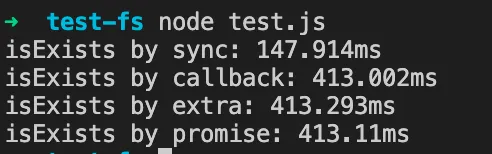
重复10w次,效果如下:

小结
从处理文件的耗时来看:sync << ( callback < promise )
【性能对比】
这里的性能对比,
不是对比处理文件时占用的内存或者cpu,
而是指对nodejs进程的占用,
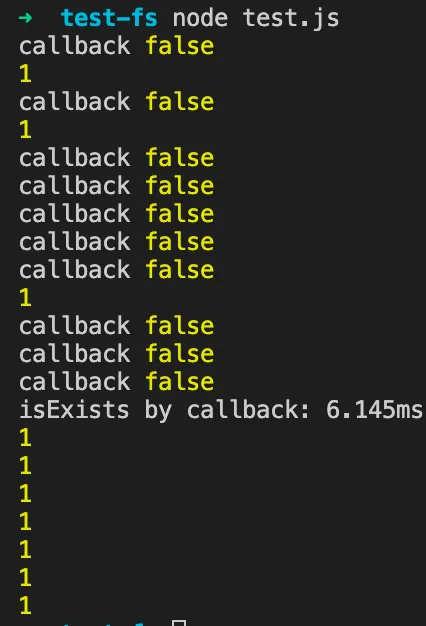
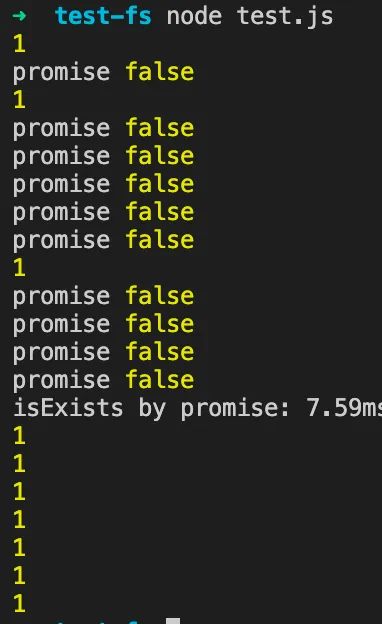
测试方式如上,只是多加了一个每1ms的打印,
let intervalIndex = 0;
const intervalId = setInterval(() => {
  console.log(1);

  intervalIndex = intervalIndex + 1;
  if (intervalIndex === 10) clearInterval(intervalId);
}, 1);
并将重复次数调整到10次,
callback方式效果
promise方式效果
sync方式效果
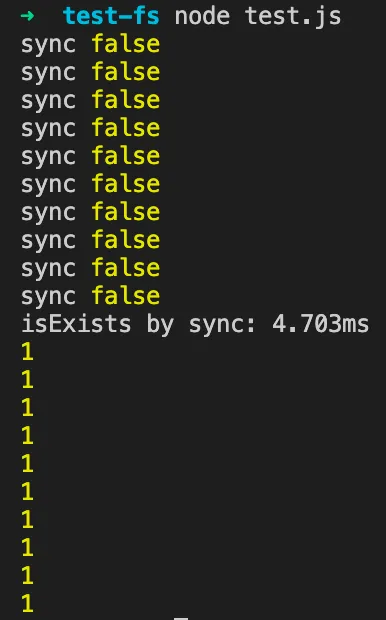
性能对比
这里可以看出sync的方式是阻塞的方式,
也就是虽然sync处理文件耗时比较少,
但是会阻塞之后所有的操作,直到sync执行完毕,
简单理解是为了“减少处理时间,优化js写法”,
而独占了nodejs进程,阻塞了其他操作。
小结
从对进程的占用来看:( callback < promise ) << sync
【高性能fs】
其实在web前端或者nodejs的开发中,
fs的频繁使用比较少,
一般是上传下载等场景会用到。
但是在electron开发桌面应用时,
fs的操作就会变的很频繁,
这个时候就要关注高性能的使用fs,
callback方式
1. 书写会导致回调地狱
2. 体现nodejs事件驱动,非阻塞io
3. 性能最好
promise方式
1. 书写需要配合async / await使用
2. 也体现事件驱动,非阻塞io
3. 性能和callback很接近,稍微有损耗
sync方式
1. 书写最简单, 也不需要async / await
2. 阻塞性使用
3. 性能极差,谨慎使用
小结
1. 如果是很简单的场景且追求耗时少,可以使用sync的方式
2. 其他场景都谨慎使用sync,而推荐使用promise的方式