
Node.js-开发实践:下载文件

【前言】
下载文件是Node.js中最常见的功能,
但实际开发中下载文件也会隐藏各种各样的坑。
【原始代码】
如果在网络搜索Node.js下载文件代码,
大概会搜到类似下面的代码片段,
本文从这里开始,陆续优化下载文件这个功能。
const http = require('http');
const https = require('https');
const fs = require('fs');

function downloadFile(url, dest) {
  let protocol = url.startsWith('https') ? https : http;
  let file = fs.createWriteStream(dest);
  protocol
    .get(url, (res) => {
      res.pipe(file);
      file.on('finish', () => {
        file.close();
        console.log('Download complete.');
      });
    })
    .on('error', (err) => {
      fs.unlink(dest);
      console.error(`Download failed: ${err.message}`);
    });
}
上面的代码片段可以看到:
1.兼容了Node.js原生的http和https请求
2.通过get请求获取url内容后pipe到本地文件写流中
3.捕获了请求的异常,异常时删除已经下载的文件
【校验url合法性】
可以看到上面代码是直接使用url的,
其实这里应该校验一下url的合法性,
代码如下:
// url
import { URL } from 'url';

/**
 * check url
 * @param {*} checkUrl
 * @returns
 */
export const checkUrl = (inputUrl) => {
  // check
  if (!inputUrl) return;

  // check url
  const url = new URL(inputUrl);
  if (!url) return;

  // check protocol
  return url.protocol === 'http:' || url.protocol === 'https:';
};
这里使用了Node.js原生的url模块进行校验
【校验dest合法性】
同样的上面代码直接使用dest目标路径,
这里同样的需要进行一些校验,
代码如下:
// fs
import { path, mkdir } from 'qiao-file';

/**
 * check dest
 * @param {*} dest
 * @returns
 */
export const checkDest = async (dest) => {
  // check dest
  if (!dest) return;

  // absolute dest
  const destIsAbsolute = path.isAbsolute(dest);
  if (!destIsAbsolute) dest = path.resolve(__dirname, dest);

  // mkdir
  const dir = path.dirname(dest);
  const mkdirRes = await mkdir(dir);
  if (!mkdirRes) return;

  // return
  return dest;
};
1. 这里兼容了dest为相对路径的情况
2. 以及如果dest的文件夹不存在则自动创建
添加url和dest校验后的代码如下:
// http
import http from 'http';
import https from 'https';

// fs
import { fs } from 'qiao-file';

// check
import { checkUrl } from './check-url.js';
import { checkDest } from './check-dest.js';

/**
 * download
 * @param {*} url
 * @param {*} dest
 * @returns
 */
export const download = async (url, dest) => {
  // check url
  if (!checkUrl(url)) return Promise.reject(new Error('url is not valid'));

  // check dest
  const newDest = await checkDest(dest);
  if (!newDest) return Promise.reject(new Error('dest is not valid'));

  // p and file
  const file = fs.createWriteStream(newDest);
  const protocol = url.startsWith('https') ? https : http;

  //
  return new Promise((resolve, reject) => {
    protocol
      .get(url, (res) => {
        // pipe
        res.pipe(file);

        // file
        file.on('finish', () => {
          file.close();

          resolve(newDest);
        });
        file.on('error', (err) => {
          fs.unlink(newDest);
          reject(err);
        });
      })
      .on('error', (err) => {
        fs.unlink(newDest);
        reject(err);
      });
  });
};
【校验文件流异常】
上面的代码中文件流的写入异常监听,
放在了res.pipe后,
如果写入的是一个没权限的路径,
则会抛出一个未捕获的异常,
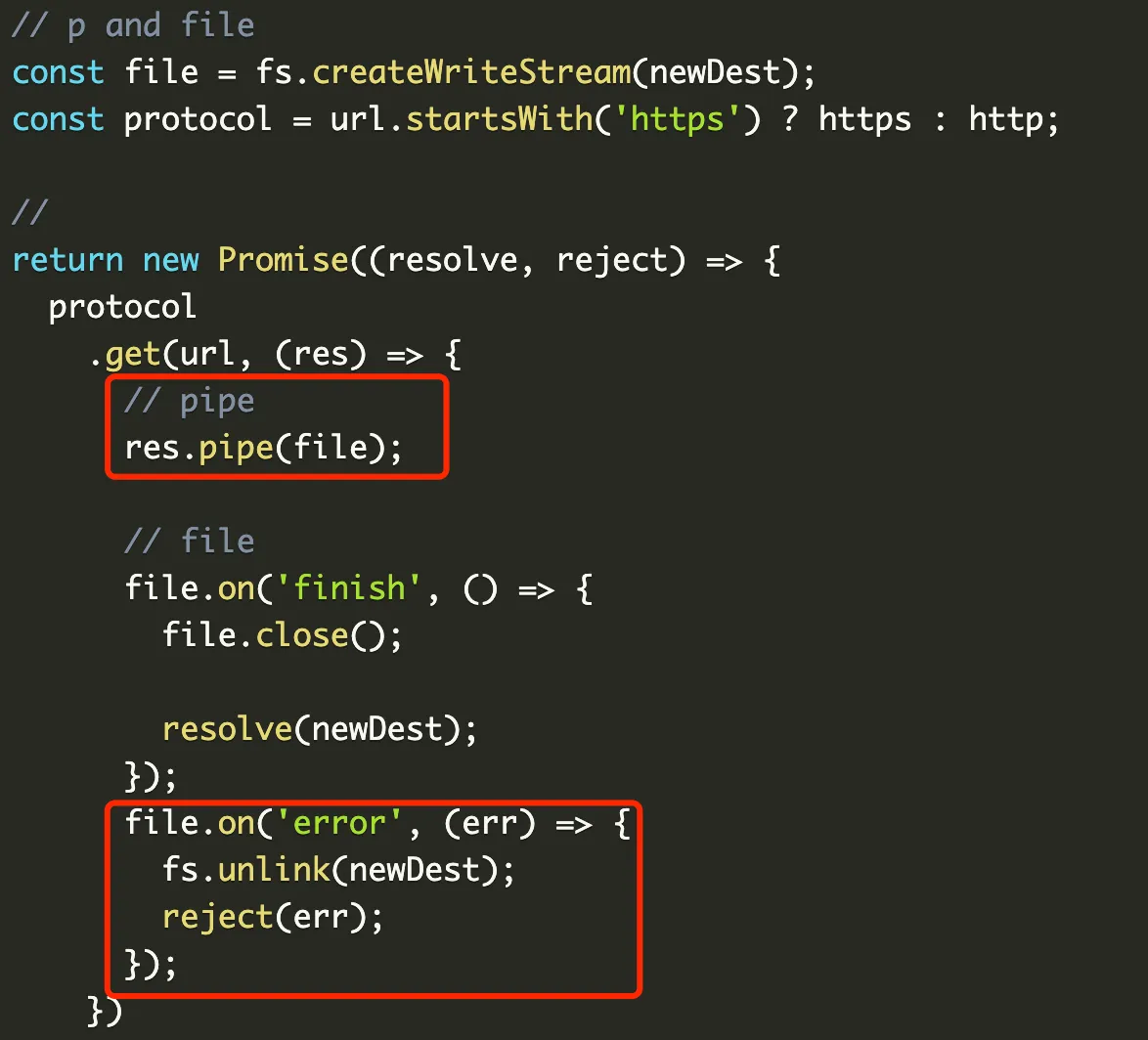
修改后如下:
return new Promise((resolve, reject) => {
  // file write stream
  const file = fs.createWriteStream(newDest);
  file.on('error', (err) => {
    reject(err);
  });
  file.on('finish', () => {
    file.close();
    resolve(newDest);
  });

  // get
  const protocol = url.startsWith('https') ? https : http;
  protocol
    .get(url, (res) => {
      // pipe
      res.pipe(file);
    })
    .on('error', (err) => {
      fs.unlink(newDest);
      reject(err);
    });
});
【校验请求异常】
上面代码中么有校验请求的异常,
例如请求响应code非200,
如果code非200,但是不会走到error的监听,
只会下载一个错误的文件,
修改代码如下:
// get
const protocol = url.startsWith('https') ? https : http;
protocol
  .get(url, (res) => {
    // check res
    if (!res || res.statusCode !== 200) {
      return reject(new Error('response status code is not 200'));
    }

    // pipe
    res.pipe(file);
  })
  .on('error', async (err) => {
    await rm(newDest);
    reject(err);
  });
【设置timeout】
接着来设置下载的超时时间,
这里并不是直接在request中设置timeout就行,
nodejs的http模块中的timeout属性,
代表的是建立连接的超时时间,
例如设置timeout 100ms,
代表建立连接超过100ms,
而不是整个下载过程超过100ms,
这里需要自己实现一下,
代码如下:
// timeout
let timeoutId;
if (timeout) {
  timeoutId = setTimeout(() => {
    if (res) res.destroy();
    clearFile(newDest);
    reject(new Error('timeout'));
  }, timeout);
}

const file = fs.createWriteStream(newDest);
file.on('error', (err) => {
  clearTimeoutFn(timeoutId, timeout);
  reject(err);
});
file.on('finish', () => {
  file.close();

  clearTimeoutFn(timeoutId, timeout);
  resolve(newDest);
});

// pipe
res.pipe(file);
1. 首先如果传入timeout参数,就启动timeout
2. 如果提前完成,则清理timeout
3. 如果没有提前,清理文件,并返回异常
【校验文件完整性】
下载完文件后需要校验文件的完整性,
这里简单校验一下文件大小,
代码如下:
export const checkFileSize = (res, dest) => {
  // check
  if (!res || !dest) return;

  // res length
  const resLength = res.headers['content-length'];
  if (!resLength) return;

  // fs length
  try {
    const s = fs.statSync(dest);
    if (!s || !s.size) return;

    return parseInt(resLength, 10) === s.size;
  } catch (error) {
    debug(error);
  }
};
【文件下载进度】
下载文件的过程中,
实时的反馈下载进度也很重要,
这里可以监听res的data事件实现,
代码如下:
// data
let data = 0;

/**
 * on progress
 * @param {*} res
 * @param {*} onProgress
 * @returns
 */
export const onDownloadProgress = (res, onProgress) => {
  // check res
  if (!res) return;

  // check progress
  if (!onProgress) return;

  // check content
  const contentLength = res.headers['content-length'];
  if (!contentLength) return;

  // total
  const total = parseInt(contentLength, 10);

  // on data
  res.on('data', (chunk) => {
    data = data + chunk.length;

    const p = (data / total).toFixed(3);
    const n = parseFloat(p);
    onProgress(n);
  });
};
【qiao-downloader】
封装了一个npm包,欢迎使用,
https://www.npmjs.com/package/qiao-downloader
1.基础的下载文件能力
2.请求异常校验
3.文件流异常校验
4.定制timeout能力
5.下载完成后文件大小校验
6.支持下载进度回调