
返回文章列表 
Node.js-WebServer开发实践:使用autocannon进行接口压测
Node.js
【前言】
AutoCannon是基于Node.js的接口压测工具,
https://www.npmjs.com/package/autocannon
【安装】
npm i autocannon -g【cli使用】
AutoCannon可以通过cli的方式使用,
其中各参数的含义可以直接输入autocannon查看,
Usage: autocannon [opts] URL

URL is any valid HTTP or HTTPS URL.
If the PORT environment variable is set, the URL can be a path. In that case 'http://localhost:$PORT/path' will be used as the URL.

Available options:

  -c/--connections NUM
        The number of concurrent connections to use. default: 10.
  -p/--pipelining NUM
        The number of pipelined requests to use. default: 1.
  -d/--duration SEC
        The number of seconds to run the autocannon. default: 10.
  -a/--amount NUM
        The number of requests to make before exiting the benchmark. If set, duration is ignored.
  -L NUM
        The number of milliseconds to elapse between taking samples. This controls the sample interval, & therefore the total number of samples, which affects statistical analyses. default: 1.
  -S/--socketPath
        A path to a Unix Domain Socket or a Windows Named Pipe. A URL is still required to send the correct Host header and path.
  -w/--workers
        Number of worker threads to use to fire requests.
  -W/--warmup
       Use a warm up interval before starting sampling.
       This enables startup processes to finish and traffic to normalize before sampling begins
       use -c and -d sub args e.g. `--warmup [ -c 1 -d 3 ]`
  --on-port
        Start the command listed after -- on the command line. When it starts listening on a port,
        start sending requests to that port. A URL is still required to send requests to
        the correct path. The hostname can be omitted, `localhost` will be used by default.
  -m/--method METHOD
        The HTTP method to use. default: 'GET'.
  -t/--timeout NUM
        The number of seconds before timing out and resetting a connection. default: 10
  -T/--title TITLE
        The title to place in the results for identification.
  -b/--body BODY
        The body of the request.
        NOTE: This option needs to be used with the '-H/--headers' option in some frameworks
  -F/--form FORM
        Upload a form (multipart/form-data). The form options can be a JSON string like
        '{ "field 1": { "type": "text", "value": "a text value"}, "field 2": { "type": "file", "path": "path to the file" } }'
        or a path to a JSON file containing the form options.
        When uploading a file the default filename value can be overridden by using the corresponding option:
        '{ "field name": { "type": "file", "path": "path to the file", "options": { "filename": "myfilename" } } }'
        Passing the filepath to the form can be done by using the corresponding option:
        '{ "field name": { "type": "file", "path": "path to the file", "options": { "filepath": "/some/path/myfilename" } } }'
  -i/--input FILE
        The body of the request. See '-b/body' for more details.
  -H/--headers K=V
        The request headers.
  --har FILE
        When provided, Autocannon will use requests from the HAR file.
        CAUTION: you have to specify one or more domains using URL option: only the HAR requests to the same domains will be considered.
        NOTE: you can still add extra headers with -H/--headers but -m/--method, -F/--form, -i/--input -b/--body will be ignored.
  -B/--bailout NUM
        The number of failures before initiating a bailout.
  -M/--maxConnectionRequests NUM
        The max number of requests to make per connection to the server.
  -O/--maxOverallRequests NUM
        The max number of requests to make overall to the server.
  -r/--connectionRate NUM
        The max number of requests to make per second from an individual connection.
  -R/--overallRate NUM
        The max number of requests to make per second from all connections.
        connection rate will take precedence if both are set.
        NOTE: if using rate limiting and a very large rate is entered which cannot be met,
              Autocannon will do as many requests as possible per second. Also, latency data will be corrected to compensate for the effects of the coordinated omission issue. If you are not familiar with the coordinated omission issue, you should probably read [this article](http://highscalability.com/blog/2015/10/5/your-load-generator-is-probably-lying-to-you-take-the-red-pi.html) or watch this [Gil Tene's talk](https://www.youtube.com/watch?v=lJ8ydIuPFeU) on the topic.
  -C/--ignoreCoordinatedOmission
        Ignore the coordinated omission issue when requests should be sent at a fixed rate using 'connectionRate' or 'overallRate'.
        NOTE: it is not recommended to enable this option.
              When the request rate cannot be met because the server is too slow, many request latencies might be missing and Autocannon might report a misleading latency distribution.
  -D/--reconnectRate NUM
        The number of requests to make before resetting a connections connection to the
        server.
  -n/--no-progress
        Don't render the progress bar. default: false.
  -l/--latency
        Print all the latency data. default: false.
  -I/--idReplacement
        Enable replacement of [<id>] with a randomly generated ID within the request body. default: false.
  -j/--json
        Print the output as newline delimited JSON. This will cause the progress bar and results not to be rendered. default: false.
  -f/--forever
        Run the benchmark forever. Efficiently restarts the benchmark on completion. default: false.
  -s/--servername
        Server name for the SNI (Server Name Indication) TLS extension. Defaults to the hostname of the URL when it is not an IP address.
  -x/--excludeErrorStats
        Exclude error statistics (non-2xx HTTP responses) from the final latency and bytes per second averages. default: false.
  -E/--expectBody EXPECTED
        Ensure the body matches this value. If enabled, mismatches count towards bailout.
        Enabling this option will slow down the load testing.
  --renderStatusCodes
        Print status codes and their respective statistics.
  --cert
        Path to cert chain in pem format
  --key
        Path to private key for specified cert in pem format
  --ca
        Path to trusted ca certificates for the test. This argument accepts both a single file as well as a list of files
  --debug
        Print connection errors to stderr.
  -v/--version
        Print the version number.
  -h/--help
        Print this menu.
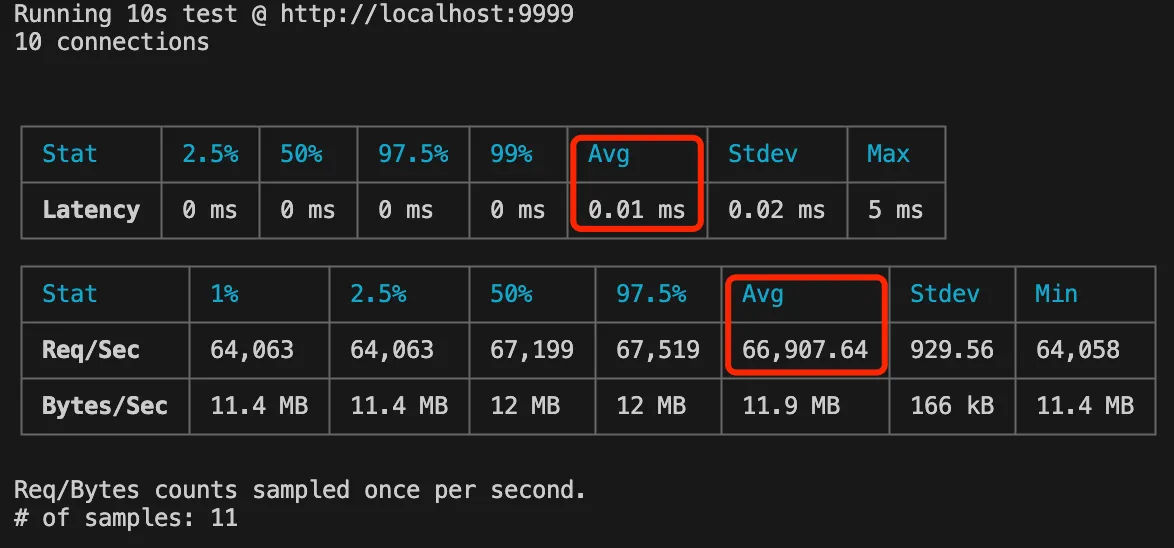
例如10个并发连接,持续10s的用法如下,
autocannon -c 10 -p 1 -d 10 http://localhost:9999结果如下,比较关键的是
1.响应时间的平均耗时
2.qps的平均值
【api使用】
除了cli的用法,autocannon也支持api使用,
例如下面代码实现效果同上,
详细用法可以看文档:https://www.npmjs.com/package/autocannon
// autocannon
const autocannon = require('autocannon');

// options
const options = {
  url: 'http://localhost:9999',
  connections: 10,
  pipelining: 1,
  duration: 10,
};

// go
const instance = autocannon(options);
autocannon.track(instance);