
规范的代码提交:Conventional Commits


【前言】
本文介绍如何提交规范的commit msg,
规范的commit msg可以看这个网站: https://www.conventionalcommits.org/en/v1.0.0/
【commitizen】
可以手动提交符合规范的commit msg,如下
git commit -m "fix: fix click button bug..."手动提交符合规范的msg比较麻烦,
可以使用commitizen这个工具,
https://www.npmjs.com/package/commitizen
安装commitizen
npm install -g commitizen安装对应的规范
npm i -D cz-conventional-changelog
echo '{ "path": "cz-conventional-changelog" }' > .czrc
使用git cz替换git commit -m提交commit,效果如下
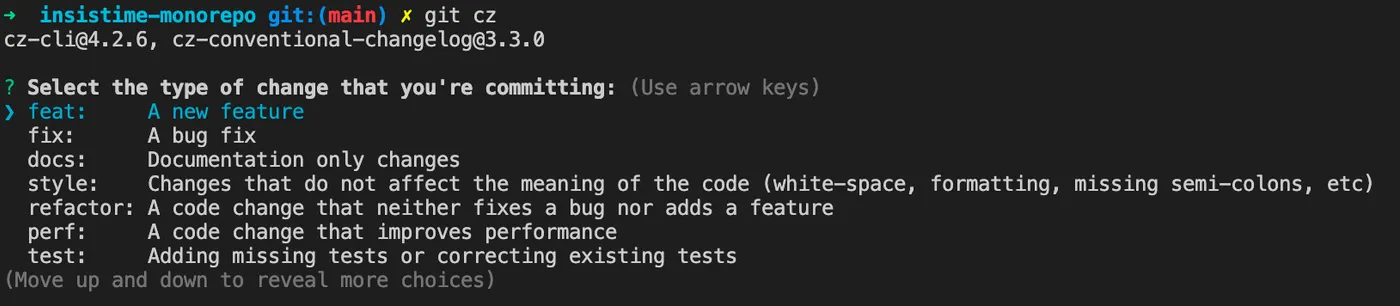
这样就可以交互式的提交符合规范的commit msg了
【commitlint+husky】
虽然已经安装了commitizen,
可以使用git cz提交符合规范的commit msg了,
但是无法约束其他人也是用git cz,
这里需要用到commitlint进行检测,
https://github.com/conventional-changelog/commitlint
但是commitlint只是检测commit msg是否规范的工具,
并不能自动检测每次提交的commit msg,
这里需要使用到husky这个git hooks工具,
https://typicode.github.io/husky/#/
安装husky
npm i -D husky注册git hooks
npx husky installpackage.json中添加脚本,使在prepare时候就注册git hooks
npm pkg set scripts.prepare="husky install"安装commitlint
npm install --save-dev @commitlint/config-conventional @commitlint/cli添加commitlint到git hook
npx husky add .husky/commit-msg 'npx --no -- commitlint --edit "$1"'添加commit规范
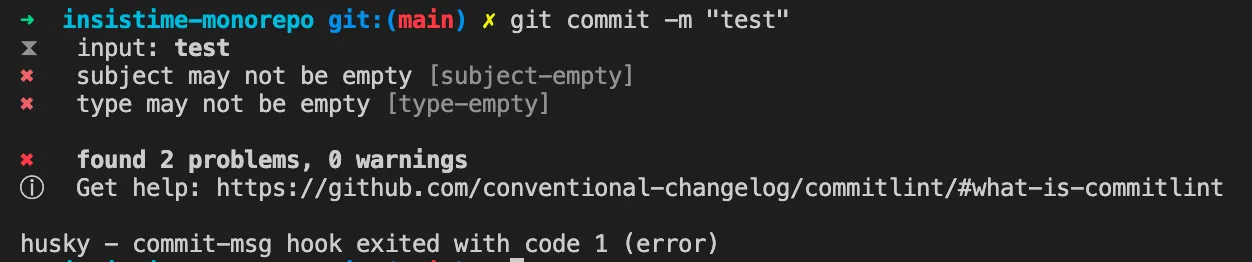
echo "module.exports = {extends: ['@commitlint/config-conventional']};" > commitlint.config.js好了,这里使用普通的git commit -m提交不符合规范的msg时,提示如下
【lerna】
如果你的项目使用lerna来管理,
通过以上配置后lerna publish会失败,
需要配置下lerna.json文件,如下
{
  "packages": ["packages/*"],
  "version": "independent",
  "command": {
    "publish": {
      "allowBranch": "master",
      "message": "chore(release): publish"
    }
  }
}
【lint-staged】
如果想通过husky添加一下其他的检查,例如eslint等,
可以使用lint-staged这个工具,
https://www.npmjs.com/package/lint-staged
lint-staged结合husky可以在commit前做一些检测
安装lint-staged
npm install --save-dev lint-staged使用husky添加一个pre commit钩子
npx husky add .husky/pre-commit "npx lint-staged"在项目根路径下创建lint-staged的配置文件.lintstagedrc.js
module.exports = {
  "*.js": "npm run lint",
};
内容可以是你自己定制的一些检测
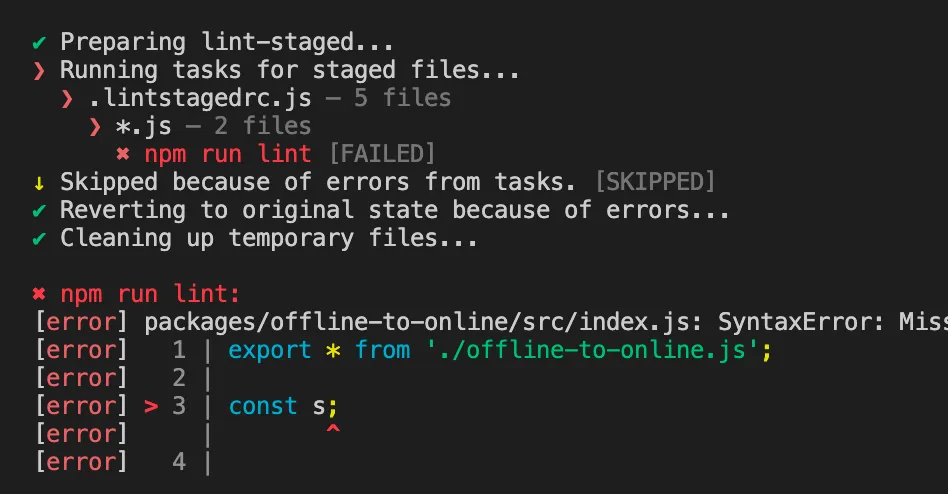
配置好后,每次commit前就会执行你配置的lint操作,例如
【总结】
1.提交符合规范的commit msg,https://www.conventionalcommits.org/en/v1.0.0/
2.使用commitizen工具提交符合规范的commit msg, https://www.npmjs.com/package/commitizen
3.使用commitlint检测提交的commit msg是否符合规范, https://github.com/conventional-changelog/commitlint
4.使用husky注册git hook在提交前使用commitlint检测提交是否规范, https://typicode.github.io/husky/#/
5.如果使用lerna管理项目,需要修改下lerna.json文件
6.使用lint-staged在提交前进行lint检测,https://www.npmjs.com/package/lint-staged
总结整个流程,如下
# 安装commitizen,安装后使用git cz替代git commit即可提交符合约定的commit
npm i -g commitizen

# 告诉commitizen使用哪个规范
npm i -D cz-conventional-changelog
echo '{ "path": "cz-conventional-changelog" }' > .czrc

# 安装husky,安装后即可通过husky配置一些git hooks
npm i -D husky

# 注册husky
npx husky install

# 添加husky的prepare脚本,目的是让其他用户在执行完npm i后自动注册husky
npm pkg set scripts.prepare="husky install"

# 上述命令在有的npm版本不支持,可以手动在package.json中添加如下脚本
"prepare": "husky install",

# 安装commitlint
npm i -D @commitlint/config-conventional @commitlint/cli

# 通过husky添加commitlint的git hook
npx husky add .husky/commit-msg 'npx --no -- commitlint --edit "$1"'

# 添加commitlint.config.js配置文件
echo "module.exports = {extends: ['@commitlint/config-conventional']};" > commitlint.config.js

# 至此添加了commitizen,可以方便的使用git cz提交符合约定的commit
# 添加了husky+commitlint的git hook,可以阻止不符合约定的commit提交

# 如果使用lerna,需要修改lerna.json
{
  "packages": ["packages/*"],
  "version": "independent",
  "command": {
    "publish": {
      "allowBranch": "master",
      "message": "chore(release): publish"
    }
  }
}

# 如果使用lint-staged,步骤如下
npm install --save-dev lint-staged
npx husky add .husky/pre-commit "npx lint-staged"

# lint staged配置文件.lintstagedrc.js
module.exports = {
  '*.js': 'npm run lint',
};相关推荐
mantine-ui快速上手
【前言】 2023年,前端开发的ui框架应该用哪个呢, 一些基本的诉求: 1.支持pc和移动端 2.支持黑夜&白天主题切换 3.组件丰富 4.支持react 4是技术栈选择,非通用 按以上要求在github上快速搜索下react相关ui库, 从start数,issues数,最后commit时间等维度
前端Monorepos项目使用npm-workspaces
【前言】 之前一直使用 lerna 来管理前端 monorepos 项目, 今天升级 lerna 后发现不支持 bootstrap 命令了, 替换为了 npm 的 workspaces 相关命令。 【lerna bootstrap】 lerna 的相关使用可以看这篇文章, 一文学会用Lerna管理多
初始化前端Monorepos项目
【前言】 本文记录初始化一个前端Monorepos项目的过程 【LICENSE】 如果是开源项目, 需要添加LICENSE, 一般推荐使用MIT LICENSE, 模板如下, 其中copyright那一行, 可以替换为自己的信息。 【git】 git的一些基础设置 设置git账号信息 配置gitig
小巧的JS测试框架:AVA
【前言】 常见的JS测试框架有Jest,Mocha等, 今天介绍一个小巧的JS测试框架:ava, https://github.com/avajs/ava
Nx-VS-Lerna
【前言】 nx和lerna都是优秀的monorepos工具, 本文来对比一下两者的不同, https://nx.dev/ https://lerna.js.org/ 对比之前可以先看下面两篇文章, 了解nx和lerna的基本使用, 一文学会用Lerna管理多个npm包 强大的构建系统:NX 【任务执